
How to make a Black Friday wishlist from the things you saved
· 7 min read
THE SHORT ANSWER
To make a Black Friday wishlist, gather the products you've saved this year into one folder, note each one's current price, set a budget and a reminder for the sale. anoli is a free iPhone app that saves products, posts and pages from any app into folders, which makes it easy to build a wishlist and spot real deals on 27 November 2026.
Black Friday 2026 falls on Friday 27 November, with Cyber Monday on 30 November. Plenty of shops start their sales days or even weeks earlier. That's a lot of emails, banners and countdown timers telling you to buy something now.
The people who do well on Black Friday aren't the ones who browse the most. They're the ones who arrive with a list. If you know what you want, what it costs today and how much you're willing to spend, you can ignore the noise and pick up the deals that actually matter. Here's how to build that list from the things you've already saved this year.
Why make a Black Friday wishlist?
Sales are designed to make you feel you'll miss out. A list protects you from that in a few ways:
- You buy what you wanted, not what was advertised. The best deal is a discount on something you'd have bought anyway.
- You can tell real discounts from fake ones. If you know the price before the sale, you know whether the sale price is actually lower.
- You stay in budget. A list with prices adds up to a number you can check against what you can afford.
- It's quicker. Sale weekends are busy. Knowing exactly what you're looking for saves hours.
Tip: consumer groups such as Which? have repeatedly found that many Black Friday deals were the same price or cheaper at other times of year. Knowing the normal price is your best defence.
Where are the things you wanted?
Most of us have been building a wishlist all year without realising it. It's just scattered:
- Products saved on Instagram from creators and brands.
- TikTok Shop finds and haul videos in your favourites.
- Pins of furniture and clothes on Pinterest.
- Product pages left open in browser tabs.
- Screenshots of things you meant to look up.
- Items already sitting in a shop's basket or wish list.
The first job is to pull those into one place.
How do you build the wishlist in anoli?
anoli is a free iPhone app that saves posts from Instagram, TikTok and any website into folders. It suits a wishlist because you can save from every app with the Share button and add notes to each item.
Step 1: make a wishlist folder
- 1Create a folder called Black Friday 2026.
- 2Inside it, make a few small folders if your list is long: Tech, Home, Clothes, Gifts.
- 3Give it a colour or emoji so it stands out from your other folders.
Step 2: gather what you've saved
- 1Go through your Instagram saved posts, TikTok favourites and Pinterest boards. For each product you still want, tap Share and choose the app, then pick the wishlist folder.
- 2For open browser tabs, tap Share in Safari or Chrome and save each page the same way, then close the tab. It feels good.
- 3On a laptop, the Anoli Chrome extension saves the page you're on in one click, and it appears on your phone.
- 4If you've saved products there already, search for them and move them into the folder.
If you've got years of Instagram saves, you can bring them all in at once from Settings and Import saved posts, then pick out the products. Our guide to exporting Instagram saved posts walks through getting the file.
Step 3: note today's price
This is the step most people skip, and it's the most useful. For each item, add a note with:
- The price today and the date: "£89, 3 Nov".
- The shop you saw it at.
- The exact version: size, colour, storage, model number.
Model numbers matter more than you'd think. Some products sold on Black Friday are special versions that look similar to the usual one but differ slightly, so checking the exact model makes price comparisons fair.
Step 4: rank and budget
- 1Decide your total budget for the sales.
- 2Add a word to each note: must, nice or only if cheap.
- 3Add up the musts. If they're already over budget, cut now, before the excitement of the sale.
Tip: add a target price to the note, like "buy if under £70". On the day, you just check the price against the number. No agonising.
Step 5: set reminders
Set a reminder on your must items for the morning of Friday 27 November, or earlier if the shop has said its sale starts sooner. When the reminder comes up, the save opens with your note, so you can go straight to the product page.
What happens on Black Friday itself?
With the list ready, the day becomes a short checklist.
- 1Open your Black Friday 2026 folder.
- 2Open each must item and check the price against your note.
- 3If it's at or under your target, buy it and mark the save as done.
- 4If not, leave it. There will be other sales, and nothing on your list is going anywhere.
- 5Only once the musts are done, look at the nice items and see what's left in the budget.
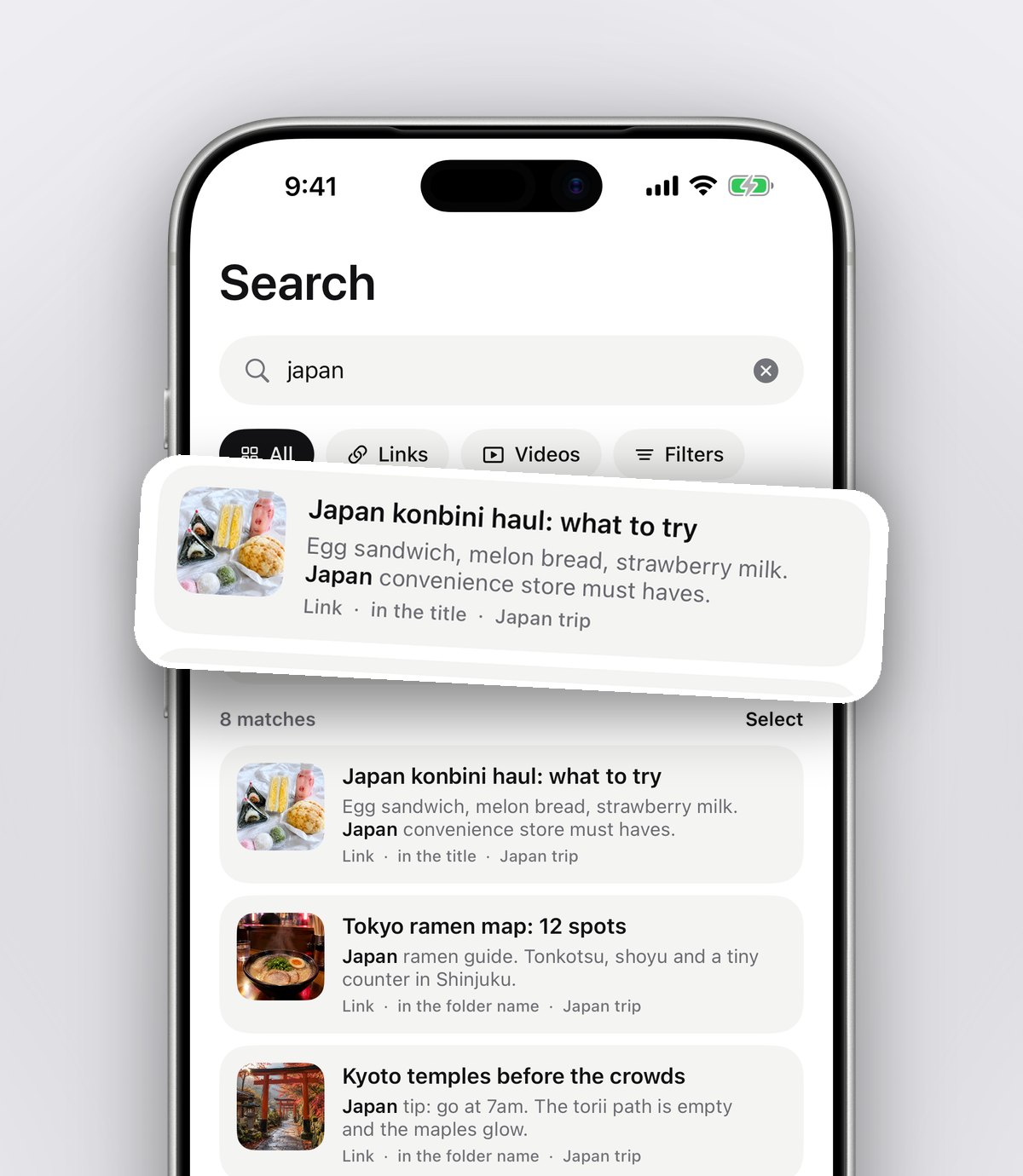
Search helps if your list is long. Type a word from your notes, like "must" or a brand name, and the app shows the matching saves with the line that matched.
Shopping for gifts in the sales
Black Friday is a good moment to tick off Christmas presents, but only if you know what you're getting each person. If you've been keeping a gift ideas list all year, copy the best ideas into your Gifts subfolder with prices. If you haven't, now is a great time to start one, with a folder per person.
If you buy gifts jointly with a partner or family, a shared folder (Folders with friends, part of Pro) means you're both looking at the same list and nobody buys the same thing twice. Every save has reactions and a conversation, so "should we get this one?" stays next to the product.
How do other wishlist tools compare?
Different tools are good at different things. A fair look:
Shop wish lists and baskets
Good for: one retailer. Some shops let you know when an item in your wish list drops in price. They can't hold products from other shops or the Instagram post where you found them.
Price tracking websites and extensions
Good for: seeing the price history of a specific product on large retailers. Very useful for checking if a deal is real. They're not a place to collect ideas from social media.
Notes or a spreadsheet
Good for: people who like totals and columns. A spreadsheet can add up your budget neatly. Saving from Instagram and TikTok into it is slow.
A save app like anoli
Good for: gathering products from every app into one folder with your notes, prices and reminders. You can still use a price tracker alongside it to check history. If links are your main issue, see our guide to saving links on iPhone.
What Black Friday traps should you watch for?
A list helps most when you know the tricks it's protecting you from. A few to watch for:
- Countdown timers. "Ends in 2 hours" pushes you to decide fast. If an item is on your list with a target price, the timer doesn't matter.
- Was prices. A crossed out price isn't always what the item usually sold for. Compare with the price in your note, not the shop's.
- Bundles. A deal that adds things you didn't want can cost more than the item alone.
- Free delivery thresholds. Adding a small extra to reach free delivery only saves money if you'd have bought it anyway.
- Buy now, pay later. Spreading the cost can make a total feel smaller than it is. Check it against your budget first.
None of these are unique to Black Friday, but they're everywhere that weekend. With a list, a price note and a budget, they lose most of their pull.
Your rights after Black Friday
It's worth remembering that in the UK, most things you buy online come with a 14 day cancellation period under the Consumer Contracts Regulations, starting when you receive the goods. Many shops also extend returns over Christmas. Keep a note of what you ordered and when in each save, so if something isn't right you know where you bought it.
After the sales
Don't delete the folder. Rename it Bought or move what you didn't buy into a general Wishlist folder. Items you skipped are perfect candidates for January sales, birthdays or Christmas lists. Your notes with old prices also give you a baseline for next year.
Get your list ready this week
You have a few weeks before the sales start. Spend twenty minutes this week gathering what you've saved into one folder and noting today's prices. You'll go into Black Friday calm, with a plan and a budget.
It's free to start, with no account and no card. Download anoli on the App Store, read what people say on our reviews page, or find out more on the anoli home page.
Questions people ask
When is Black Friday 2026 in the UK?
Black Friday 2026 is on Friday 27 November, and Cyber Monday is on 30 November. Many UK shops start their sales earlier in the month.
How do I know if a Black Friday deal is real?
Write down the normal price before the sale starts. If the sale price isn't lower than what you noted, it isn't a real deal. Price history tools can also help on larger retailers.
What's the best way to make a Black Friday wishlist?
Gather the products you've saved from Instagram, TikTok, Pinterest and websites into one folder, note each price and model, rank them and set a budget. An app like anoli makes the gathering quick.
Can I return things I buy on Black Friday?
For most online purchases in the UK you have a 14 day cancellation period from when you receive the goods, and many shops extend returns over Christmas. Check each shop's policy.
Can I share a wishlist with my partner?
Yes. With a shared folder (part of Pro) you both see the same list, react to items and avoid buying the same thing twice.
Try it with your own saves
Free to start on iPhone and iPad. See what people say.