
Planning a Christmas market trip from the places you saved
· 8 min read
THE SHORT ANSWER
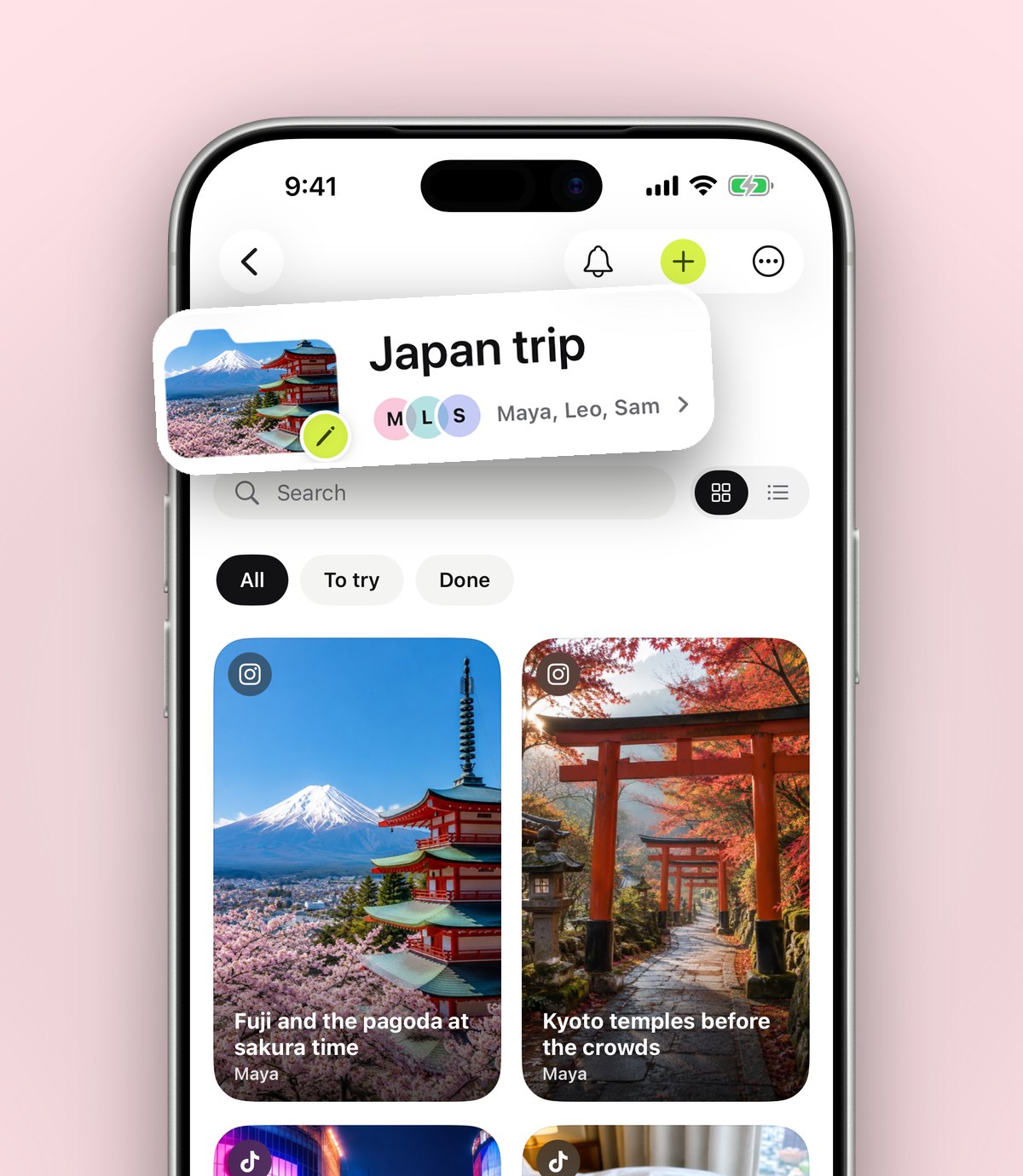
The easiest way to plan a Christmas market trip is to gather every market, food stall and café you saved into one folder, check opening dates on each market's official page, then group the places by area so each day is a short walk. anoli, a free iPhone app that saves posts from Instagram, TikTok and any website into folders, keeps those saves together and lets the people coming with you add their finds to the same shared folder.
Every November the reels start. Wooden huts glowing under fairy lights, a cup of something hot steaming in gloved hands, a square in Vienna or Strasbourg or Edinburgh that looks like a film set. You save one, then another, then a TikTok about the best bratwurst stall, then a carousel of the cosiest cafés nearby. By the time someone in the group chat says "shall we actually go this year?", the ideas are spread across two apps, a dozen screenshots and somebody else's phone.
Christmas market trips are short, busy and seasonal, which makes them unforgiving. You might have one weekend, the markets may only be open for a few weeks, and the best places get crowded fast. A bit of planning from the things you already saved turns a cold, confusing wander into an evening you'll actually remember. Here's how to do it without spending a whole night on spreadsheets.
When do Christmas markets open?
Most Christmas markets in Europe and the UK open in the second half of November and run until just before Christmas. Some start earlier, a few close on different days, and some carry on into the new year. Opening hours vary too: many are busiest in the evening and at weekends, and some stalls close earlier on Sundays.
Dates change from year to year, so don't rely on a reel from last December. Before you book anything, check each market's official website or the city's tourist board page. Write the dates and opening hours into a note on the save so you have them on the day without searching again.
Tip: if you can choose, go on a weekday evening. The lights look the same, the queues are shorter and you can actually reach the stalls.
How do I gather all the market posts I've saved?
The hard part isn't finding ideas. It's that your ideas are scattered. Instagram saves sit in one grid, TikTok favourites in another, and the blog post about the best markets is somewhere in your browser history. The first job is getting them into one place.
Make one trip folder
Create a folder named after the trip: Vienna markets, Christmas in Edinburgh, or just Market weekend. If you already have a Travel folder, put the new folder inside it so last summer's trip and this one don't get mixed up.
Share every save into it
From now on, when you see a market, a stall or a café you like, tap Share on the post and choose anoli. anoli reads the caption, sees it's a travel save and files it in Travel, and you can move it into the trip folder with one tap. Move a few and it learns where similar saves should go next time.
The first time, scroll the app row in the share sheet to the end, tap More, then Edit, switch anoli on and drag it to the front. After that it's always one tap away. If anything doesn't show up, the support page walks through the setup.
Bring in what you saved months ago
Lots of the best market content was posted last winter, which means it's probably buried deep in your saves already. You can bring old saves across in bulk: we covered that in how to export your Instagram saved posts, and the same import in anoli reads TikTok favourites and Pinterest boards too.
How do I plan a Christmas market trip, step by step?
Once your saves are in one folder, planning takes about an evening. This is the order that works best.
- 1Check the dates first. Open each market save and confirm the opening dates and hours on the official page. Delete any market that won't be open while you're there.
- 2Pick your base. Look at where the markets you saved actually are. In many cities there are several markets a short walk apart, so a hotel in the middle of them saves a lot of cold walking.
- 3Group saves by area. Make small folders inside the trip folder for each neighbourhood or each day, then drag the saves in. Food stalls, cafés and markets that sit close together end up in the same place.
- 4See it on a map. Saved places can be shown on a map, so you can spot which ones are clustered together and which one is a 40 minute tram ride on its own.
- 5Add a reason to each save. A note like "the cheese raclette stall by the church" or "book a table, it's tiny" means you won't need to rewatch the video on a freezing street corner.
- 6Set a reminder for anything time sensitive. Ice rinks, carol concerts and popular restaurants often need booking ahead. A reminder on the save means you book in time instead of remembering on the train home.
- 7Share the folder with whoever is coming. Everyone sees the same plan and can add what they find.
How do you plan a Christmas market trip with friends?
Group trips have a particular failure mode: four people, four sets of saves, and a group chat where links scroll out of sight within an hour. One shared folder fixes most of it.
Open the trip folder, tap the three dots and share it. Send the link to your friends. Folders with friends is part of anoli Pro: once someone joins, anything either of you saves to the folder lands there for everyone, and each save has reactions and a little conversation underneath it. Anyone with the link can also view the folder on the web, which is handy for the friend who hasn't installed anything yet.
Deciding where to eat
The other group trip problem is choosing. Six people standing outside a market at 7pm, nobody wanting to be the one to decide. From the folder's ⋯ menu you can use Decide together: everyone swipes on the saves, and the group can see what people agree on. It works nicely for choosing tonight's dinner from the restaurants you all saved, or picking which two markets make the cut when you only have one evening.
We wrote more about group planning in the easiest way to plan a trip with friends, if you want the full version.
What should I save for a Christmas market trip?
It's tempting to only save the pretty market shots. The saves that make a trip work are often the boring ones.
- The markets themselves, with dates and opening hours in a note.
- Food and drink stalls that a creator recommended by name, so you don't settle for the first queue you see.
- A warm café or pub nearby for when your feet go numb. Every good market day needs one.
- Indoor plans in case of rain or sleet: museums, a covered food hall, a bookshop.
- Booking confirmations. You can save PDFs and files too, so train tickets and the hotel booking can sit in the same folder as the stalls.
- A packing list. Gloves, a hat, a scarf, comfortable boots, a power bank, some cash for stalls that prefer it. Write it as a note in the folder.
Tip: some markets charge a deposit for a reusable mug that you get back when you return it, or can keep as a souvenir. If a reel mentions it, add it to your note so you're not caught out at the stall.
UK Christmas markets or a trip abroad?
Both are lovely, and the planning is the same. What changes is what you need to save.
- A UK city market is easy for a day trip or a single night. Save the train times and a backup lunch spot, and you're mostly done.
- A European city break needs more: flights or the train, a hotel close to the markets, currency, and maybe a day trip to a smaller town. Folders inside folders help here: one for travel and bookings, one for markets, one for food.
- A smaller town market can be quieter and more charming than a capital city, but stalls and cafés may close earlier. Note the hours carefully.
Whichever you choose, the folder you build this year is worth keeping. Next November you'll have a ready made list, and you can send the link to anyone who asks where you went.
What are the other ways to plan it?
There's no single right tool. Here's what each common option is good at.
- Instagram and TikTok saves on their own. Great for discovery and free, but saves from each app stay in that app, and finding one specific stall later means scrolling.
- Google Maps saved lists. Very good for pins on a map and sharing a list of places. Less good for keeping the original video, the caption and the creator's tips.
- A notes app or spreadsheet. Flexible and familiar, but you have to copy and paste everything yourself, and nobody else in the group keeps it up to date.
- anoli. Keeps the original posts from every app together, sorts them for you, shows places on a map and lets the whole group add to one folder. It's iPhone and iPad only for now.
If you want to see how it looks with real saves, the home page has screenshots, and the reviews page has what people say about it.
On the day: using your folder at the market
Open the trip folder when you arrive. Everything is there: the original post, the caption, your notes and the map. The videos play inside the app with proper controls, so you can pause on the frame showing which corner of the square the stall is in, or slow it down to read a sign.
Search helps when you're standing in the cold and can't remember a name. Type "raclette" or "mulled cider" and the save turns up, because search looks inside captions and notes, not just titles. It shows the matching line, so you can see straight away whether it's the one you meant.
When you've been somewhere, mark it as done. By the end of the weekend the folder becomes a record of the trip, which is lovely to look back on, and in December the app shows a look back at what you saved during the year.
Start your Christmas market folder tonight
You've probably already saved half of this trip without realising. Make one folder, share your favourite market posts into it, check the dates, and send the link to whoever is coming. The planning that usually takes a week of messages can be done in an evening.
anoli is free to start, with no account or card needed, and Pro is £10 a year if you want shared folders and unlimited saves. If that sounds useful, get anoli for iPhone on the App Store and make your first trip folder before the markets open. For a more general version of this method, see how to plan a trip from the places you saved.
Questions people ask
When do most Christmas markets open?
Most Christmas markets in the UK and Europe open in the second half of November and run until just before Christmas, with some opening earlier or staying open into the new year. Dates change every year, so check each market's official website before you book.
How many days do you need for a Christmas market trip?
For one city, a weekend or two nights is usually enough to see the main markets in the evening and explore by day. Add a day if you want to visit a smaller town market nearby.
How can I keep all my saved Christmas market posts in one place?
Share each post from Instagram, TikTok or your browser to a save app such as anoli, which files them into folders. You can make one folder for the trip and move every market, stall and café into it.
What's the best way to plan a Christmas market trip with friends?
Use one shared list everyone can add to instead of a group chat. In anoli, a shared folder lets everyone add their saves, react and comment, and Decide together helps the group choose where to eat.
What should I bring to a Christmas market?
Warm layers, gloves, a hat and comfortable boots, a charged phone or power bank, and some cash in case a stall prefers it. Some markets use reusable mugs with a deposit.
Try it with your own saves
Free to start on iPhone and iPad. See what people say.