
Instagram collections vs a save app: which keeps saves organised?
· 6 min read
THE SHORT ANSWER
Instagram collections are free folders for your saved posts, and they work well if you save a few posts and pick a collection every time. A save app suits heavier savers: anoli is a free iPhone app that files posts from Instagram, TikTok and any website into folders automatically and lets you search their captions, which Instagram collections cannot do.
Instagram collections are the closest thing Instagram has to folders. You can make one for recipes, one for outfits, one for a trip, and drop saved posts into them. For a lot of people, that is enough. For others, collections slowly stop being used, and everything piles up in All posts again.
This guide explains exactly how Instagram collections work, how to get the most out of them, where they run out of road, and when it makes sense to use a separate save app instead. It is an honest comparison: collections are genuinely good at some things.
How do Instagram collections work?
When you save a post on Instagram, it goes into your Saved section. Collections are named groups inside Saved. A post can be in All posts only, or in one or more collections as well.
How to create a collection
- 1Tap your profile picture, then the menu icon (three lines), then Saved.
- 2Tap the plus button at the top.
- 3Give the collection a name, then tap Next.
- 4Choose posts from your existing saves to add, or skip and add them later.
How to save a post straight into a collection
Tap the bookmark under a post. A small Save to collection prompt appears at the bottom of the screen. Tap it and pick a collection, or make a new one there. You can also press and hold the bookmark icon to go straight to the collection picker.
How to edit or delete a collection
Open the collection, tap the three dots at the top, and choose to edit it. You can rename it, choose a cover image, or delete it. Deleting a collection does not unsave the posts: they stay in All posts.
Who can see your collections?
Your saves and collections are private. The person who posted something does not see that you saved it. Business and creator accounts can see how many times a post was saved, but not who saved it.
What are Instagram collections good at?
Credit where it is due. Collections have real strengths.
- They are free and built in. Nothing to install, no account to make.
- They are right where you are. You save without leaving the app.
- They are private by default. Nobody sees what you saved.
- A post can be in more than one collection. Handy for a dish that is both a weeknight dinner and good for friends coming over.
- They are quick for small numbers. If you save a couple of posts a week, a few collections can keep things perfectly tidy.
Where do Instagram collections fall short?
The problems show up as your saves grow.
You have to choose every time
The Save to collection prompt disappears after a moment. If you are scrolling quickly, you tap the bookmark and move on, and the post goes into All posts. After a few weeks of that, your collections are out of date and All posts is a mess again.
There is no search
You cannot search inside your saves or inside a collection. If you remember a word from the caption, like "tahini" or "Porto", there is no way to type it and get the post back. You scroll.
Collections cannot have collections inside them
Collections are one level deep. You cannot have Recipes with Baking and Weeknights inside it. You end up with a long, flat list of collections, or a few huge ones.
They only hold Instagram posts
A trip, a dinner party or a room makeover rarely comes from one app. The TikTok of the same restaurant, the YouTube tutorial, the shop page: none of them can go into an Instagram collection.
Posts can disappear
If the creator deletes or archives a post, it can vanish from your saves and collections. There is no note of what it was.
No notes or reminders
You cannot add a note to a saved post to say why you saved it, or set a reminder to book the place before it gets busy.
How does a save app compare?
A save app is an app built just for keeping things you find online. The idea is that you save through the Share button instead of the bookmark, and the app handles the organising.
anoli is a free iPhone and iPad app that does this. Here is how it compares, point by point.
- Choosing a folder: collections need you to pick one every time. anoli reads the caption and files the post itself. If it is unsure, the post waits in Needs sorting for one tap, and moving a save teaches it for next time.
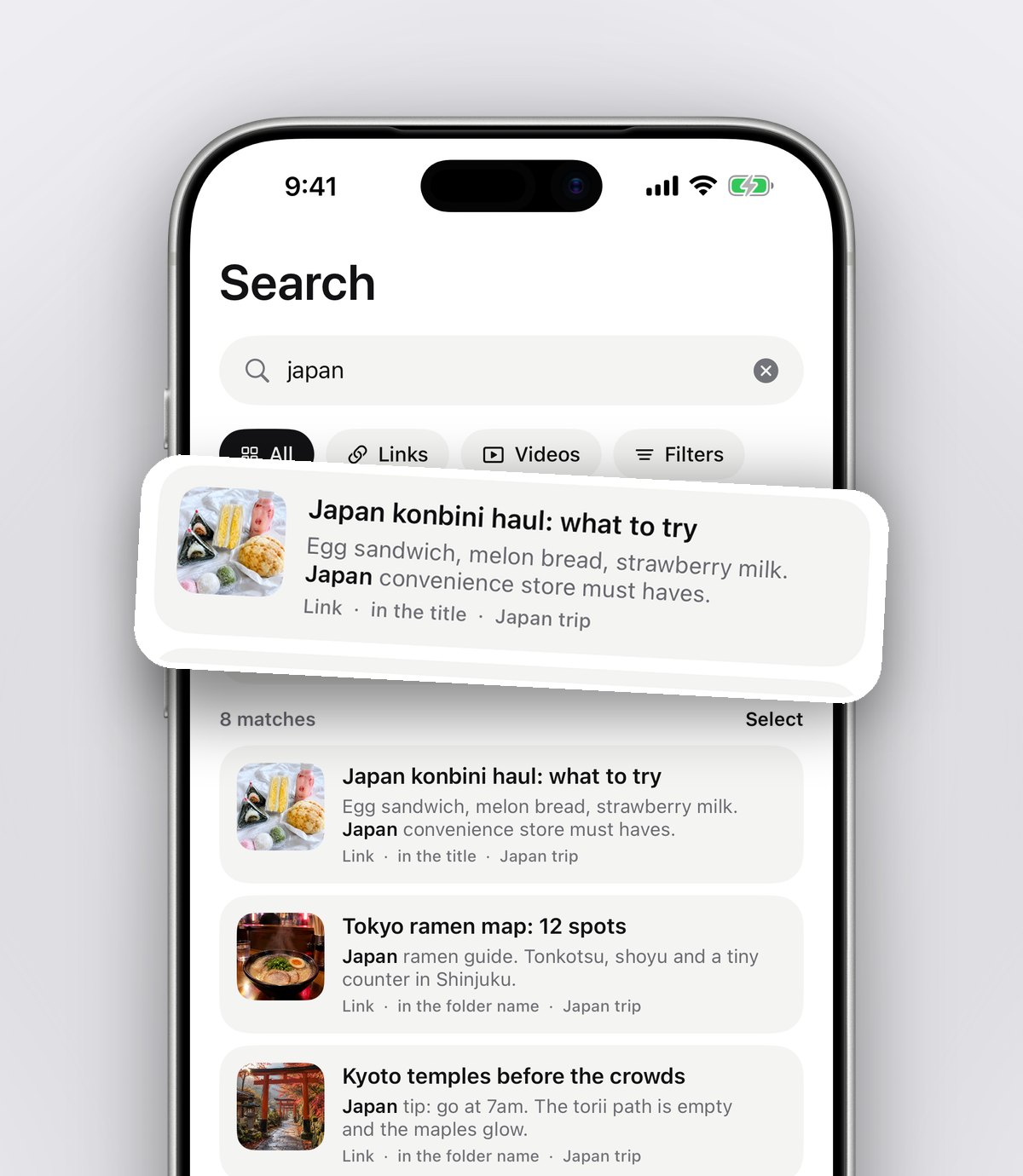
- Search: collections have none. anoli searches inside captions, notes, transcripts, tags and creator names, and shows the line that matched.
- Folders inside folders: collections are one level. Folders in the app can sit inside other folders.
- Other apps: collections hold Instagram only. The app saves from TikTok, YouTube, Pinterest, X, Reddit, Threads, Facebook, Telegram and every browser too.
- Notes and reminders: collections have neither. The app lets you add notes, set reminders and mark saves as done.
- Sharing with friends: with anoli Pro, you can share a folder with one link, and everything either of you saves lands in it, with reactions and a conversation on each save.
- Price: collections are free. The app is free to start, and Pro is £10 a year.
- Convenience: collections win slightly here, because the bookmark is right under the post. Sharing to the app is one extra tap.
Tip: you do not have to choose one or the other. Plenty of people keep tapping the bookmark for quick, throwaway saves, and share the posts they actually want to act on, like recipes and places, to a save app.
Who should stick with Instagram collections?
Collections are the right choice if:
- You save a few posts a week, not a few a day.
- Almost everything you save comes from Instagram.
- You are happy to pick a collection every time.
- You mostly browse your saves for inspiration rather than looking for one particular post.
Who is better off with a save app?
A save app makes more sense if:
- Your All posts grid is hundreds or thousands deep.
- You often go looking for one specific post and cannot find it.
- You save the same kind of thing from TikTok, YouTube or websites as well.
- You want to act on saves: cook the recipe, book the restaurant, do the workout.
- You plan things with other people and want one shared list.
How to move from collections to anoli without losing anything
If you decide to switch, you can bring your collections with you.
- 1In Instagram, go to Accounts Centre and request a download of your information. Instagram will tell you when it is ready.
- 2Download anoli free on the App Store. No account or card needed to start.
- 3In the app, open Settings, then Import saved posts, and choose the file you downloaded.
- 4Your Instagram collections become folders with the same names. Everything that was only in All posts is sorted into folders automatically, and anything unclear waits in Needs sorting.
- 5From now on, when you want to keep a post, tap Share on it, open the share sheet and choose anoli. The first time, scroll the app row to the end, tap More, then Edit, switch anoli on and drag it to the front.
If the share sheet step does not work, our support page has the fixes. For the full picture of Instagram saving options, see our guide to the best app to save Instagram posts, and if you are trying to track down one particular reel, how to find your saved reels shows where to look.
Getting the most from either option
Whichever you use, a few habits keep things tidy:
- Use few, broad groups. Six good collections or folders beat thirty half used ones.
- Name things by what you will do. Cook this month, Book for birthday, Try in spring.
- Have a short clear out every month. Unsave anything you have lost interest in.
- Keep the important part in words. If a post has a recipe or an address in it, make sure that text lives somewhere searchable, not just in a post that might be deleted.
The verdict
Instagram collections are a free, private and perfectly decent way to group a modest number of saves, as long as you pick a collection every time. Once your saves grow, the lack of search, nested folders and other apps starts to hurt. That is where a save app like anoli earns its place: it sorts for you, searches inside posts and keeps Instagram saves next to everything else you save. Find out more on the anoli home page or read what people say in reviews.
Questions people ask
How do I make a collection on Instagram?
Go to your profile, open the menu, tap Saved, then tap the plus button. Name the collection and choose saved posts to add to it.
Can people see my Instagram collections?
No. Saved posts and collections are private. Creators with professional accounts can see how many people saved a post, but not who.
Can you search Instagram collections?
No. Instagram does not offer search inside your saved posts or collections. A save app like anoli lets you search captions, notes and creator names.
Does deleting a collection delete the saved posts?
No. Deleting a collection removes the group, but the posts stay in All posts until you unsave them.
Can I import Instagram collections into another app?
Yes. Download your information from Instagram's Accounts Centre, then use Settings, Import saved posts in anoli. Collections become folders with the same names.
Can I make folders inside Instagram collections?
No. Collections are one level deep. anoli lets you put folders inside folders.
Try it with your own saves
Free to start on iPhone and iPad. See what people say.