
The best app to save and organise Instagram posts in 2026
· 8 min read
THE SHORT ANSWER
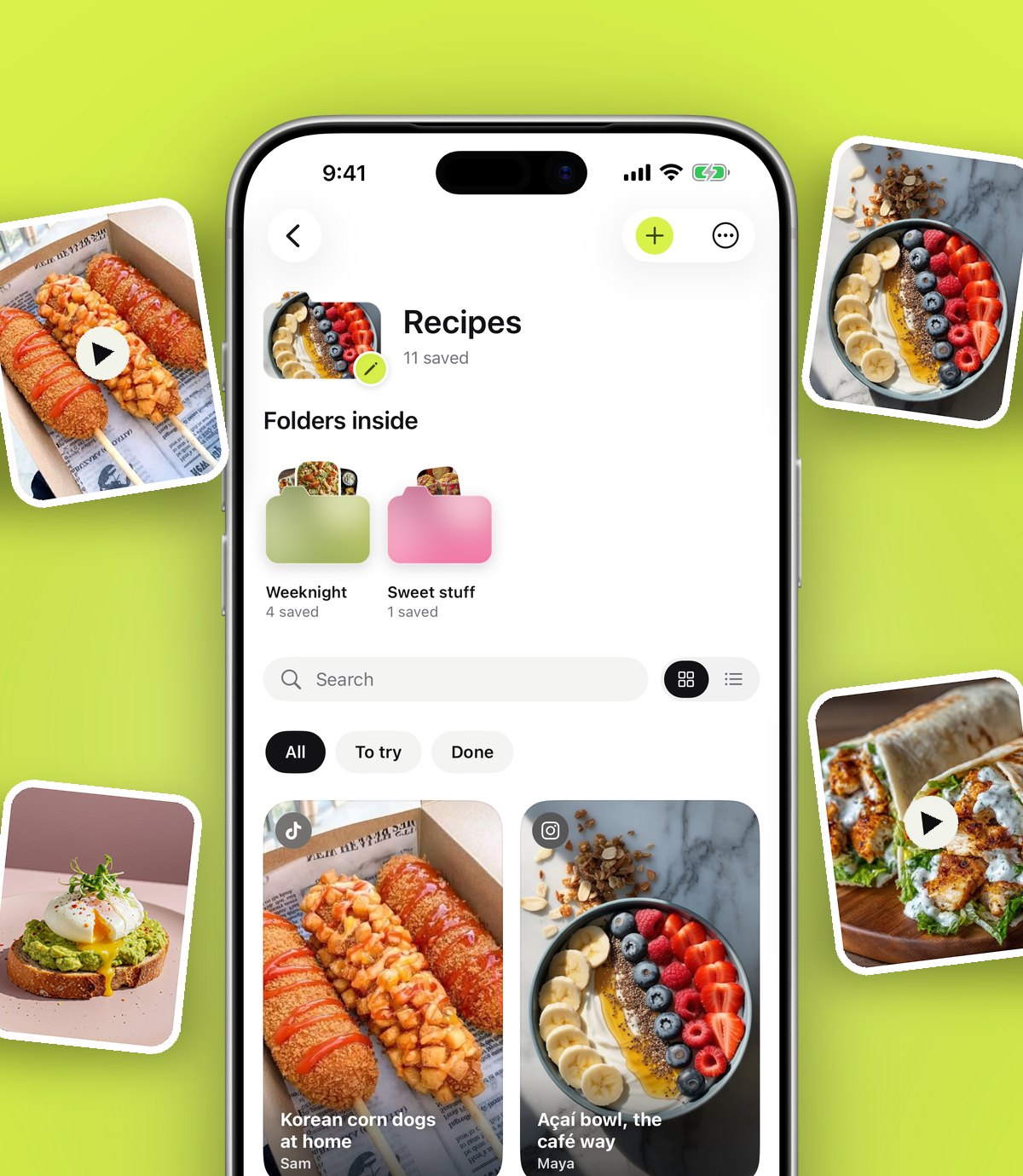
The best app to save Instagram posts is one that sorts them for you and lets you search them later. anoli is a free iPhone app that saves posts from Instagram, TikTok and any website into folders: tap Share on a post, choose anoli, and it reads the caption and files it in the right place, such as Recipes or Travel.
Saving an Instagram post takes one tap. Finding it again is another story. The bookmark icon drops everything into one long grid, newest first, so a pasta recipe from March sits somewhere between a pair of trainers, a hotel in Porto and a meme you saved for your brother.
If you save more than a few posts a week, you have probably felt this already. You know the post exists. You just cannot find it without scrolling for five minutes. This guide covers what Instagram gives you for free, what a good save app adds, and how to set one up in about two minutes.
Why is it so hard to find saved Instagram posts?
Instagram's Saved section was designed to hold things, not to help you find them. A few things make it tricky once your saves grow:
- Everything lands in All posts, in one grid, unless you pick a collection every single time you save.
- There is no search inside your saves, so you cannot type a word from the caption and get the post back.
- The useful part of a post, like the recipe, the address or the list of products, is usually in the caption, which you cannot see from the grid.
- When a creator deletes or archives a post, it can quietly disappear from your saves.
- Your saves only live in Instagram. The TikToks, YouTube videos and websites you saved about the same thing are somewhere else.
None of this matters when you have twenty saves. It matters a lot when you have two thousand.
What should an app to save Instagram posts actually do?
There are lots of apps that claim to help with saved posts. Before you pick one, it helps to know what genuinely makes a difference day to day. Here is a short checklist.
It should save from the Share button
You are already in Instagram when you find something good. The best app is one you can reach from the Share button on the post, so saving takes the same effort as tapping the bookmark. Anything that makes you copy a link, open another app and paste will not survive a busy week.
It should sort for you
Folders are only useful if things end up in them. If you have to choose a folder every time, you will stop doing it within a fortnight, which is exactly what happens with Instagram collections. Look for an app that reads the post and files it automatically, and asks you only when it is unsure.
It should let you search inside posts
You rarely remember who posted something. You remember a word: halloumi, Lisbon, glute bridge, linen trousers. Search that looks through captions and your own notes is the difference between finding a post in three seconds and giving up.
It should work beyond Instagram
Your ideas for one trip or one dinner are spread across apps. A good save app takes TikTok, YouTube, Pinterest, Reddit and websites as well, so the folder for Lisbon has everything for Lisbon in it.
It should keep the post playable
A link on its own is not enough if you have to open Instagram and wait every time you want to rewatch a reel. Being able to watch the video, swipe the carousel and read the caption inside the app saves a lot of jumping around.
It should be honest about your data
Check where your saves are stored, whether you can export them, and whether you can delete your account in one go. You are trusting the app with a list of everything you are interested in.
What are the options for saving Instagram posts?
There is no single right answer for everyone, so here is a fair look at the common choices and what each is good for.
- Instagram's own Saved and collections. Free and built in, and great if you save a handful of things and are disciplined about picking a collection. Weak on search, and it only holds Instagram posts.
- Screenshots. Fast, and they work offline. But they lose the link, the video and most of the caption, and they bury themselves in your camera roll among photos of your friends.
- Apple Notes or a notes app. Good for a short list you write yourself, like a packing list with a couple of links. Pasting dozens of links by hand gets tiring, and the notes do not sort themselves.
- Pinterest. Excellent for visual boards and for finding new ideas. It is less handy for saving reels from Instagram, and you still choose a board each time.
- A dedicated save app. Built for this exact job: save from any app, sort automatically, search later. This is where our app fits.
How anoli handles Instagram saves
anoli is an iPhone and iPad app that keeps the things you save online in one place and sorts them into folders. It was made in the UK and it is free to start, with no account and no card needed.
When you share an Instagram post to anoli, it reads the caption and the page and files the save into the right folder, such as Recipes, Workouts or Travel. If it is not sure, the save waits in Needs sorting, where you can file it with one tap. When you move a save, it learns from it for next time.
Inside the app, Instagram reels play with proper controls, so you can pause, scrub and change the speed. Carousels stay swipeable. Each folder shows its three latest saves peeking out, so you can see what is inside at a glance, and you can give a folder a cover photo, a colour or an emoji.
Search looks inside captions, your notes, transcripts, tags and creator names, and it shows you the matching line so you know you have the right post. You can filter by links, notes, photos, videos or files, and a calendar shows what you saved on any given day.
Tip: add a short note when you save something you will want to act on, like "try with chicken thighs" or "book two weeks ahead". Search finds your notes too, so future you will thank you.
How to set it up (about two minutes)
- 1Download the app from the App Store and open it once. You do not need to make an account to start.
- 2Open Instagram, find any post or reel, and tap the Share button (the paper plane).
- 3Tap Share to, or the share option that opens your iPhone's share sheet, then scroll the row of apps to the end and tap More.
- 4Tap Edit, switch anoli on, and drag it to the front of the list so it is always one tap away.
- 5Tap anoli. The post is saved and filed, and you are straight back in Instagram.
- 6Open the app later and look at Needs sorting. File anything waiting there with one tap.
If it does not show up in the share sheet, the support page walks through the usual fixes, such as restarting the phone after the first install.
What about the hundreds of posts you have already saved?
Most people come to this problem with a big backlog, not a blank slate. You do not have to reshare every old post by hand.
Instagram lets you download a copy of your information from Accounts Centre. Once the download is ready, open the app, go to Settings, then Import saved posts, and pick the file. Your Instagram collections become folders, and everything else is sorted the same way as a new save. Recipes go to Recipes, places go to Travel, and anything unclear waits in Needs sorting.
If you want ideas for what to do with all those recipe reels once they are sorted, our guide on how to save Instagram recipes you can actually find goes into cooking from your saves.
Does it work for TikTok and other apps too?
Yes. The same Share, then anoli, works in TikTok, YouTube, Pinterest, X, Reddit, Threads, Facebook, Telegram, Safari and any other browser, even Apple Notes. A restaurant from TikTok and a restaurant from Instagram end up in the same Food folder.
This matters more than it sounds. Plans rarely come from one app. If you are thinking about a weekend away, your saves might be a hotel reel on Instagram, a café on TikTok and a blog post in Safari. Keeping them together is what turns a pile of saves into a plan. Our post on planning a trip from saved posts shows how that looks in practice, and organising saved TikToks covers the TikTok side in more detail.
Is it worth paying for a save app?
You can do a lot without paying anything. The app is free to start, and that includes saving from the share sheet, automatic sorting and search.
anoli Pro is £10 a year (or the local equivalent) through the App Store, and you can cancel any time in your iPhone settings. Pro adds unlimited saves, notes, photos and files, picture covers for folders, summaries and transcripts, and folders you share with friends.
Summaries are the part people tend to use most. Tap Summarise on a recipe reel and the caption becomes a tidy list of ingredients and steps. Attach the video and it listens to what is said in it too, which helps when the recipe is spoken rather than written.
Whether that is worth £10 a year depends on how much you save. If you save a couple of posts a month, Instagram collections may be all you need. If you save every day and keep losing things, a tool built for the job pays for itself in time.
A simple system that sticks
The best setup is the one you will still be using in three months. Keep it light:
- Start with a few broad folders: Recipes, Travel, Style, Home, Workouts. Let the sorting do the rest.
- Make a new folder only when one gets crowded, for example Weeknight dinners inside Recipes. Folders can live inside folders.
- Check Needs sorting once a week. It takes a minute.
- Use reminders for things with a date, like a restaurant you want to book or a sale ending.
- When you have done something, mark it as done so the folder stays about what is next.
Tip: if you share a home or travel with someone, put the shared stuff in a folder you both use. Everything either of you saves lands in the same place, and you can react and comment on each save.
The short answer
If you only save now and then, Instagram's collections are fine. If your saves have become a junk drawer, use an app that saves from the Share button, sorts for you and lets you search inside posts. That is what we built anoli to do. You can read what people say about it on our reviews page, or find out more on the anoli home page.
Questions people ask
Can I organise my saved Instagram posts into folders?
Yes. Instagram has collections, which you choose when you save a post. A save app like anoli goes further by filing posts into folders automatically and letting you search inside them.
Is there an app that automatically sorts saved Instagram posts?
anoli reads the caption of each post you share to it and files it into the right folder, such as Recipes or Travel. If it is not sure, the post waits in Needs sorting for you to file with one tap.
Can I search my saved Instagram posts?
Instagram does not offer search inside your saves. In anoli, search looks through captions, your notes, transcripts, tags and creator names and shows the matching line.
Do saved Instagram posts disappear?
If a creator deletes or archives a post, it can disappear from your Instagram saves. Adding a note to an important save in anoli means you keep what mattered about it in your own words.
Is anoli free?
anoli is free to start, with no account and no card needed. anoli Pro is £10 a year through the App Store and adds unlimited saves, summaries, transcripts and shared folders.
Is anoli on Android?
Not yet. anoli is available for iPhone and iPad on the App Store.
Try it with your own saves
Free to start on iPhone and iPad. See what people say.