
Organise saved content: Pinterest boards, reels and screenshots
· 7 min read
THE SHORT ANSWER
To organise saved content from Pinterest, Instagram, TikTok and your screenshots, bring it all into one set of folders instead of keeping it in each app. Import your old saves, share new ones to the same place, and use a handful of broad folders with search doing the rest. anoli is a free iPhone app that does this: it imports Instagram, TikTok and Pinterest saves, files new saves from any app into folders and makes them all searchable.
Think about where your ideas actually live. There's a Pinterest board for the bathroom. A few hundred saved reels on Instagram, a couple of collections you started and abandoned. A TikTok favourites list that goes back years. A camera roll full of screenshots: recipes, outfits, a quote, a train time, a product you meant to look up. And twenty browser tabs, of course.
Each of those apps is decent on its own. The trouble is that none of them talk to each other, so your recipe ideas are split four ways and your travel plans five. When you need something, you don't search, you guess which app it might be in. This guide is about giving all of it one home, without throwing away the parts that work.
Why is saved content so scattered?
Because every app wants you to save inside it. That makes sense for them, and it's easy for you in the moment, but it means your saves are organised by where you found them rather than what they're about.
- Pinterest organises by boards, which is great, but only for pins.
- Instagram has a Saved list and optional collections, which only hold Instagram posts.
- TikTok has Favourites and collections, which only hold TikToks.
- Screenshots have no structure at all, beyond the date.
- Browser bookmarks and tabs are their own little world.
What you actually want is to open Recipes and see every recipe, whether it came from a pin, a reel, a TikTok or a screenshot of a cookbook. That means one place, sorted by topic.
What should the one home look like?
Before moving anything, decide on a simple structure. Simple is the important word. Systems with fifty folders and strict rules don't survive a busy month.
A handful of broad folders
Start with the topics you save most. For most people that's something like Recipes, Travel, Home, Style, Workouts, Gifts, Learning and Funny. Eight to twelve folders is plenty to start.
Folders inside folders, only where needed
If one folder gets big, split it inside: Travel gets a folder per trip, Home gets a folder per room. Don't create them in advance. Let them appear when you need them.
Let search do the rest
You don't need a folder for everything if search is good. A search that looks inside captions, notes, PDFs and creator names means "that lasagne" or "the green sofa" can be found wherever it's filed.
How do I bring everything together?
This is the part people dread, so it helps to do it in order. Here's how it works with anoli, a free iPhone app that saves posts from Instagram, TikTok, Pinterest and any website into folders.
- 1Set up your main folders first. Use the names you'd naturally use. Imported boards join folders with the same name, so naming them first makes the import tidier.
- 2Import Pinterest. In Pinterest, tap your profile picture, then settings, then Privacy and data, and Request your data. When the email arrives, download the file on your iPhone. In anoli open Settings, then Import saved posts, and pick it. Each board becomes a folder, or joins your folder with the same name.
- 3Import Instagram. In Instagram, open Accounts Centre, then Your information and permissions, then Download your information. Choose Some of your information, tick Saved and pick JSON. Import it the same way. Collections become folders, and everything else is sorted.
- 4Import TikTok. In TikTok, go to Settings and privacy, then Account, then Download your data, and choose JSON. Import it the same way, and your favourites are sorted into folders.
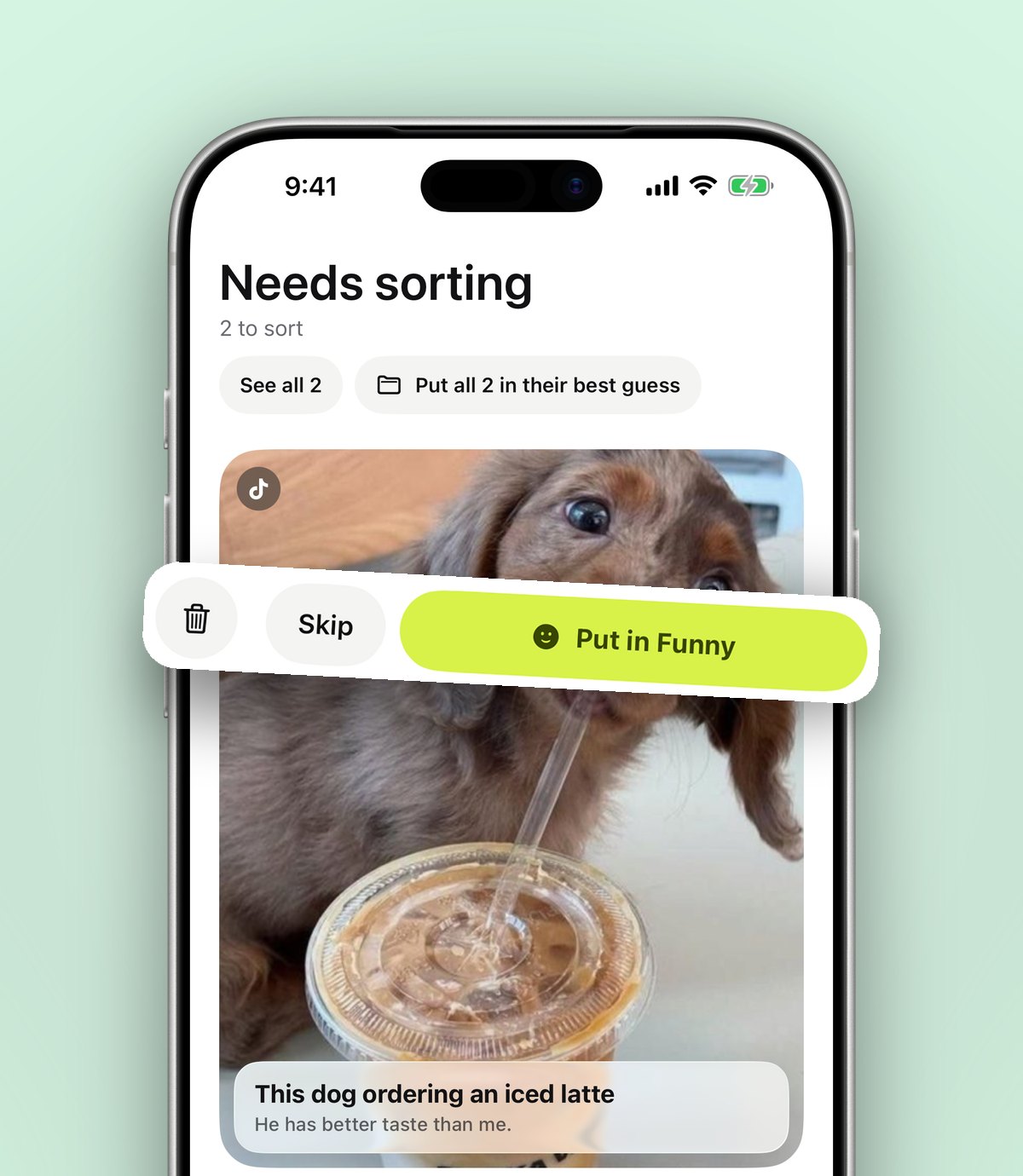
- 5Clear Needs sorting. Anything anoli wasn't sure about waits here. Tap through it and file each one. Every move teaches it for next time.
- 6Deal with screenshots in batches. Open Photos, select the screenshots worth keeping, share them to anoli and delete the rest.
None of the downloads need unzipping, and if you import again later, anything already in anoli is skipped. Data downloads can take a while to arrive, especially from Pinterest, so request all three today and import them as they come in. The step by step for Instagram is in how to export your Instagram saved posts.
Tip: don't try to sort years of screenshots in one sitting. Do one month at a time, or just the last three months, and delete freely. Most screenshots were only needed for a day.
What about screenshots specifically?
Screenshots are the messiest part, because they're mixed in with real photos and most of them are no longer needed. A quick method:
- Use the Screenshots album in Photos so you're only looking at screenshots, not your holiday pictures.
- Ask one question per screenshot: will I need this again? Receipts, tickets and boarding passes that have passed can go.
- Keep the useful ones as saves. Share recipes, outfits and ideas into the right folder and add a note saying what it is.
- Next time, save instead of screenshotting. If it's a post, sharing it keeps the caption and link, which a screenshot loses.
We wrote a full guide on organising screenshots on iPhone if you have thousands to get through.
How do I keep it organised from now on?
The import catches up on the past. The habit that keeps it tidy is simple: save to one place, from every app.
- 1In Instagram, TikTok, Pinterest, YouTube, Safari or any app with a Share button, tap Share.
- 2Choose anoli. The first time, scroll the app row to the end, tap More, then Edit, switch it on and drag it to the front.
- 3The share sheet saves and closes immediately. The app reads the caption or page and files the save.
On a laptop, the anoli Chrome extension does the same with one click. If anything isn't working, the support page can help.
You can still use Pinterest boards and Instagram collections if you enjoy them. The difference is that your one home now holds everything, so you always know where to look.
What do you get once it's all in one place?
This is when the effort pays off.
- One search for everything. Search looks inside notes, captions, transcripts, PDFs, tags and creators, and shows the line that matched. You can filter by links, notes, photos, videos and files.
- A calendar of saves. See what you saved on any day, handy when you remember when, not what.
- Folders that look good. Each one shows its three latest saves peeking out, with a cover photo, colour or emoji.
- Videos and carousels that work. Reels, TikToks and YouTube videos play with pause, scrub and speed. Carousels and slide posts stay swipeable.
- Shared folders. With Pro, share a folder with one link so a partner or friends can add to it.
- Your data stays yours. One button exports everything as a zip.
How do I stop it getting messy again?
Even one home gets cluttered if you never look at it. Ten minutes once a month is enough to keep it calm.
- Empty Needs sorting. File whatever is waiting. It rarely takes more than a couple of minutes.
- Mark things as done. The recipe you cooked, the place you visited, the outfit you bought. Done saves stop crowding the ones still to do.
- Delete the trend of the month. If you can't remember why you saved it, you probably don't need it.
- Split any folder that's become a scroll. When a folder has more than you can scan comfortably, make two or three folders inside it.
- Set a reminder for anything with a date. Sales, concerts, bookings and seasonal recipes are easy to miss, and a reminder brings them back at the right time.
That small routine is the difference between a tidy library you trust and a second junk drawer.
Do I still need Pinterest?
Maybe, and that's fine. It's worth being fair about what each app does best.
- Pinterest is unbeatable for discovering ideas and building visual mood boards. Keep using it for inspiration.
- Instagram and TikTok are where much of the useful content is posted, and their save buttons are quick.
- The Photos app is the right home for your real photos, not for a recipe screenshot.
- A notes app is good for writing, less good for holding posts and videos.
- anoli is the layer that brings them together: saves from every app, sorted by topic, searchable in one place. It's on iPhone and iPad.
If you're weighing up whether to move away from Pinterest altogether, we looked at that in a Pinterest alternative for saving ideas from every app. For the bigger idea of keeping everything you collect in one trusted place, see build a simple second brain on your phone.
Start with one request today
Request your data from Pinterest, Instagram and TikTok now, because the downloads take time. While you wait, set up your main folders and start sharing new saves into them. By the weekend, years of scattered ideas can live in one place.
anoli is free to start with no account and no card. Pro is £10 a year for unlimited saves, photos and files, plus shared folders. See it on the home page, read the reviews, and download anoli from the App Store when you're ready.
Questions people ask
How do I organise all my saved posts in one place?
Use one save app for every app instead of saving inside each one. Import your existing saves from Instagram, TikTok and Pinterest, then share new saves to the same place. anoli does both and sorts saves into folders.
Can I combine Pinterest boards and Instagram saves?
Not inside either app, but you can bring both into a third app. In anoli, Settings then Import saved posts reads Pinterest and Instagram downloads, and boards and collections become folders.
How do I organise screenshots on iPhone?
Open the Screenshots album in Photos, delete what you no longer need and move the useful ones somewhere organised. Sharing them to a save app with a short note makes them searchable.
How many folders should I have for saved content?
Start with eight to twelve broad folders for the topics you save most, and only add folders inside them when one gets too big. Good search means you don't need a folder for everything.
How long does a Pinterest data download take?
Pinterest emails you a link when the file is ready, which can take a few days. Instagram and TikTok downloads are often quicker but can also take time.
Try it with your own saves
Free to start on iPhone and iPad. See what people say.