
Save Instagram posts on iPhone without downloading or screenshots
· 7 min read
THE SHORT ANSWER
To keep Instagram posts on your iPhone without downloading or screenshotting them, save the post's link along with its caption in a save app instead of a copy of the file. anoli is a free iPhone app that does this from Instagram's Share button: it keeps the original post, caption and creator, files it into a folder and lets you search it later, without filling your camera roll or using downloader sites.
There are really only three things most people do when they want to keep an Instagram post. They tap the bookmark and hope they'll find it again. They take a screenshot, which ends up between holiday photos and a picture of a parking space. Or they paste the link into a downloader website that's covered in pop ups and asks for nothing good.
None of those is great. The bookmark hides things in one long grid. Screenshots lose the caption, the creator and the video. Downloader sites copy someone else's work, often break, and are a strange place to hand your browsing to. There's a calmer way that keeps the post itself, and it takes one tap more than the bookmark.
Why not just download Instagram posts?
It's worth being clear about what you actually want. Usually it isn't the video file. It's being able to find the recipe, the workout or the café again in three weeks, with the caption that explains it.
- A downloaded video loses the caption. The ingredients, the address, the sets and reps are usually written underneath, not shown on screen.
- It loses the creator. You can't follow them, credit them or check their newer posts.
- It fills your phone. Videos are big. A few hundred saved reels in your camera roll add up to gigabytes.
- Downloader sites are a gamble. Many are full of adverts, some ask you to log in with your Instagram details, which you should never do on a third party site, and they break whenever Instagram changes something.
- It isn't yours to repost. Saving for yourself is one thing, but a downloaded copy makes it very easy to share someone's work without credit.
Instagram itself offers a download option for some public reels, depending on the creator's settings, and you can always download your own posts. For everything else, keeping a link to the original is the respectful and practical option.
What does Instagram's own save button do?
The bookmark under a post adds it to your Saved list, which only you can see. You can also sort saves into collections, which is genuinely useful if you remember to pick one each time. On iPhone you'll find them by going to your profile, tapping the menu and choosing Saved.
The limits are the ones everybody runs into: no proper search across your saves, everything newest first, and saves that disappear if the creator deletes or archives the post. We compared it in detail in Instagram collections vs a save app, and if you're hunting for something you saved ages ago, how to find your saved reels on Instagram walks through it.
How do I save an Instagram post on iPhone without screenshotting?
The trick is to use the Share button rather than the bookmark, and send the post to an app that's built for keeping things. Here's how it works with anoli, a free iPhone app that saves posts from Instagram, TikTok and any website into folders.
- 1Open the post or reel in Instagram and tap the Share button (the paper plane).
- 2In the sheet that opens, look along the row of apps. The first time, scroll to the end, tap More, then Edit, switch anoli on and drag it to the front.
- 3Tap anoli. The share sheet saves the post and closes straight away, so you're back in Instagram in about a second.
- 4anoli reads the caption and files the post into the right folder, such as Recipes, Workouts or Travel. If it isn't sure, the post waits in Needs sorting for you to place with one tap.
- 5Next time you want it, open the app and search for any word you remember from the caption.
If the app doesn't appear in the share sheet after updating your phone, the support page has a quick fix.
Tip: in Instagram's share sheet you can also tap Copy link. If you're in a hurry, copy the link and add it later from the plus button in the app. It's the same save, just a few seconds slower.
What actually gets saved?
This is the part that replaces a screenshot. When you share a post this way, the app keeps:
- The link to the original post, so you can always open it in Instagram.
- The caption, which is where most of the useful information lives.
- The creator's name, so you can find their other posts and credit them.
- A preview picture, so your folders look like a pinboard rather than a list of links.
- Carousels stay swipeable, so a ten slide guide doesn't become one screenshot of slide one.
Reels play inside the app with proper video controls: pause, scrub back and change the speed. That's handy for a fast recipe or a workout where you need to see a movement twice. The video streams from the original post rather than living in your camera roll, so it doesn't eat your storage.
Is it private?
Saving to anoli doesn't notify the creator and isn't visible to your followers. Your folders, links and notes sync to your account so they're safe if you change phone. Photos, videos and files you add yourself stay on your phone unless you put them in a shared folder or use them as a cover.
If you ever want everything out, one button exports all of it as a zip file, and one deletes the account completely. You don't need an account to start at all.
How do I find a saved Instagram post later?
Saving is the easy half. The reason people screenshot is that they don't trust themselves to find the post again. A few habits make finding it effortless.
Search the words, not the date
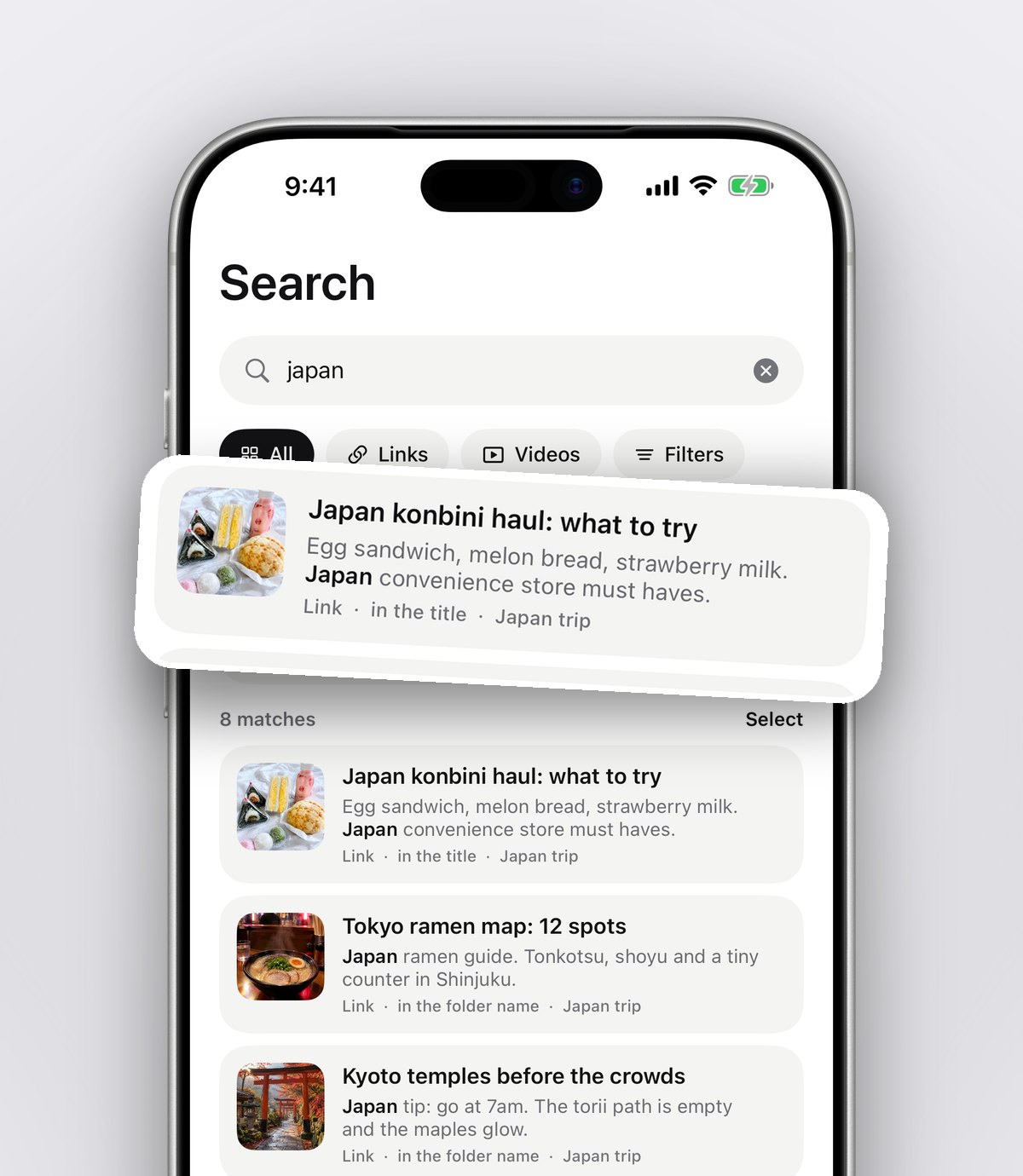
Search looks inside captions, notes, tags, creator names and transcripts, and shows the line that matched. You don't need to remember when you saved something, only a word from it: "miso", "glute", "Lisbon", "linen".
Filter by type
If you know it was a video, filter to videos. If it was a note you wrote, filter to notes. It narrows a few hundred saves down to a handful.
Use the calendar
Sometimes you remember the moment, not the content: "it was the night before my birthday". The calendar shows what you saved on each day.
Add a short note
When you save something you'll want for a specific reason, add a few words: "for Sam's birthday" or "try with chicken thighs". Your note becomes searchable too. For more on this, see how to search your saved Instagram posts.
What about posts I've already saved or screenshotted?
You don't have to start from zero.
- Your Instagram saves. Request your information from Instagram (Accounts Centre, then Your information and permissions, then Download your information, tick Saved, choose JSON). When the file arrives, open Settings in the app, then Import saved posts and pick the download. Collections become folders and everything else is sorted. The full walkthrough is in how to export your Instagram saved posts.
- Your screenshots. You can share photos from the Photos app too, and they'll sit in folders with your other saves. For a full clear out, sort the screenshots you still need first and delete the rest in one go.
Which way of saving Instagram posts is best?
Each option has its place. A quick honest comparison:
- Instagram bookmark and collections. Free, built in and one tap. Best if you save a little and browse your saves often. Weak on search and on posts that later get deleted.
- Screenshots. Instant and work offline. Fine for a single image you need once. Poor for videos, captions and anything you want to find again in a month.
- Downloader websites. They give you the file, but lose the caption, raise privacy worries and copy someone else's work. Best avoided.
- Copying the link into Notes. Free and searchable by whatever you type, but it's manual, and a list of bare links doesn't show you what anything is.
- A save app like anoli. Keeps the original post, the caption and the creator, sorts it for you and makes it searchable. It works across Instagram, TikTok, YouTube, Pinterest and websites, so everything lives in one place. iPhone and iPad only for now.
You can see how it looks on the home page, and the reviews page shows what people think of it.
Make the switch with your next save
You don't need a big tidy up to start. The next time you're about to screenshot a reel, tap Share and send it to anoli instead. Do it for a week and you'll notice your camera roll stays cleaner and you actually find things when you need them.
anoli is free to start with no account and no card. Pro is £10 a year for unlimited saves, summaries and shared folders, and you can cancel any time in your iPhone settings. Download anoli from the App Store and try it on the next post you love.
Questions people ask
Can you save Instagram posts to your iPhone without downloading them?
Yes. Instead of downloading the file, share the post to a save app that keeps the link, caption and creator. anoli does this from Instagram's Share button and sorts the post into a folder.
Does Instagram tell someone if you save their post?
No. Instagram does not notify people when you save their post to your Saved list, and saving a post's link to another app does not notify them either.
Is it safe to use Instagram downloader websites?
Many are full of adverts and some ask for your Instagram login, which you should never give to a third party site. They also lose the caption and copy someone else's work, so keeping a link is usually the better option.
What happens to my saved posts if the creator deletes them?
If a creator deletes or archives a post, it disappears from your Instagram saves and the original can no longer be opened. Saving the caption and a note alongside the link means you still keep the key information.
Where are saved posts on Instagram on iPhone?
Go to your profile, tap the menu in the top corner and choose Saved. You'll see All posts plus any collections you've made.
Try it with your own saves
Free to start on iPhone and iPad. See what people say.