
The best recipe organiser app for Instagram and TikTok recipes
· 7 min read
THE SHORT ANSWER
The best recipe organiser app for recipes from Instagram and TikTok is one that saves straight from the Share button and turns a caption or video into ingredients and steps. anoli is a free iPhone app that files recipe reels and TikToks into a Recipes folder automatically, lets you search by ingredient, and has a cooking mode with big steps and the screen kept on. For recipes from websites, dedicated apps like Paprika and Mela are also excellent.
Recipe books used to live on a shelf. Then they moved to bookmarks in a browser. Now, for a lot of people, the recipe book is a few hundred reels and TikToks scattered across two apps, plus a handful of screenshots of captions and one or two blog recipes you keep meaning to try.
That shift has broken most recipe apps, because they were built for recipe websites with neat ingredient lists. A reel has a video, a caption that may or may not contain the recipe, and sometimes a creator saying "full recipe in the comments". This guide looks at what a recipe organiser app needs to do today, compares the main options fairly, and shows a setup that takes a few minutes.
What makes a good recipe organiser app now?
If most of your recipes come from social media, look for these five things.
Saving straight from Instagram and TikTok
You find recipes while scrolling. If saving means copying a link, switching apps and pasting, you will do it twice and then go back to the bookmark. The app should appear in the Share button of every app you use.
Sorting without effort
One big Recipes folder is fine at first. After a hundred saves you want Weeknight dinners, Baking, Meal prep, Sunday roasts. The app should put things in the right place for you, or at least make it a single tap.
Turning a caption into a recipe
Recipes on social media are written for scrolling, not cooking. Emoji bullets, the method run into one paragraph, quantities hidden in the middle of a sentence. A good organiser should tidy that into ingredients and steps you can follow with sticky hands.
Search by ingredient
You open the fridge, you have half a bag of spinach and some feta. You want every saved recipe that uses feta. Search that looks inside captions and notes makes that possible.
Something kitchen friendly
Big text, the screen staying on, and steps you can move through without scrolling up and down a long caption.
The main recipe organiser apps, compared
Every one of these is good at something. Here is an honest look.
Paprika
Paprika has been around for years and is loved by people who cook from recipe websites. It has a built in browser that pulls ingredients and steps out of recipe pages, plus meal planning and shopping lists. It is a one off purchase rather than a subscription. It is less suited to reels and TikToks, because they do not have the structured recipe data that websites do.
Mela
Mela is a well designed recipe manager for iPhone, iPad and Mac. Like Paprika, it is excellent at importing recipes from websites and keeping them in a tidy, consistent format. Again, social video recipes are not its main strength.
Pinterest is brilliant for discovering recipes and building visual boards. It is free and huge. You do have to pick a board each time, and saving a reel from Instagram or a TikTok into Pinterest is not as natural as saving a blog recipe.
Instagram collections and TikTok favourites
Free and built in. Good enough if you save a few recipes a month and remember to use collections. There is no search inside your saves, recipes from different apps stay apart, and posts can disappear if the creator deletes them.
Apple Notes
Lots of people keep a recipe note and paste links or type up favourites. It is free and flexible, and great for a small set of family recipes you have written out yourself. It gets messy with dozens of pasted links.
anoli
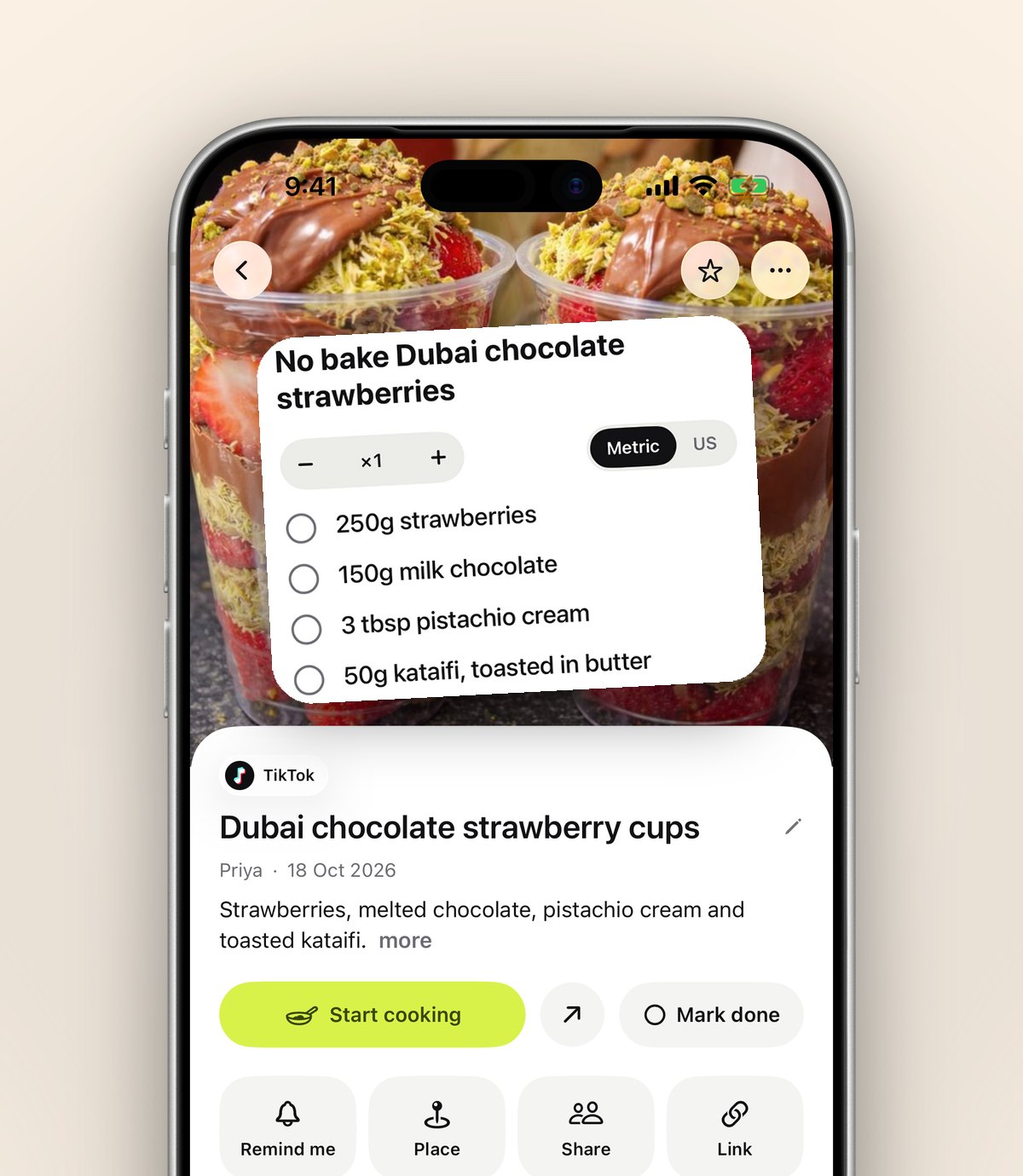
anoli is an iPhone and iPad app that saves posts from Instagram, TikTok and any website into folders, and it was designed around exactly the kind of recipe you find on social media. Share a reel to it and it reads the caption, sees it is a recipe and files it in Recipes. It is free to start, with no account or card.
Quick comparison
- Mostly blog and website recipes: Paprika or Mela.
- Mostly browsing for inspiration: Pinterest.
- A few family recipes you have typed up: Apple Notes.
- Mostly reels and TikToks, plus some websites, sorted for you: anoli.
Some people use two. A dedicated recipe manager for tried and tested favourites, and a save app for the stream of new ideas from social media. That is a perfectly sensible setup.
How anoli works as a recipe organiser
Here is what happens to a recipe once you share it.
- It goes to the right folder. The caption is read and the recipe lands in Recipes, or in a folder inside it if you have made one. If it is unsure, the save waits in Needs sorting.
- It stays watchable. Reels and TikToks play in the app with pause, scrub and speed controls, so you can slow down the bit where they fold the dumplings.
- It can become a proper recipe. With Pro, tap Summarise and the caption becomes ingredients and steps. Attach the video and the app listens to what is said in it as well, for recipes that are spoken rather than written.
- It is searchable. Search looks inside captions, transcripts, notes and creator names, and shows the matching line. Type "feta" and every feta recipe appears.
- It is ready for the kitchen. Cooking mode shows the ingredients, then one step per page in big type, with big Back and Next buttons, and keeps the screen on.
Tip: after you cook something, add a quick note like "double the garlic" or "kids loved it", then mark it as done. Over time, your Recipes folder becomes a record of what actually works in your kitchen, not just what looked nice.
How to set up your recipe organiser in five minutes
- 1Get anoli free from the App Store and open it once.
- 2In Instagram or TikTok, open a recipe and tap Share. Open the full share sheet, scroll the app row to the end, tap More, then Edit. Switch anoli on and drag it to the front.
- 3Share three or four recipes you have been meaning to make. Watch them land in Recipes.
- 4If your Recipes folder is going to be big, add a few folders inside it: Quick, Baking, Batch cooking, Treats. Move a recipe once and the app learns where similar ones go.
- 5Give the folder a cover photo of something you have cooked, or an emoji, so it is easy to spot.
- 6Bring your backlog in. In Settings, Import saved posts reads the data download from Instagram, TikTok and Pinterest, so your old saved recipes get sorted too.
If the share sheet step does not work first time, the support page has the fixes.
What about recipes from websites and cookbooks?
The same Share button works in Safari and every other browser, so a recipe from a food blog joins the recipe reels in the same folder. On a laptop, the Anoli Chrome extension saves a page with one click and it appears on your phone.
For a recipe in a cookbook or a handwritten card from your nan, take a photo and save it to the folder, or write it out as a note. Photos and notes are searchable alongside everything else, and with Pro there is no limit on how many you keep. PDFs work too, which is handy for recipe cards from a cookery class or a newsletter.
Sharing recipes with the people you cook with
A recipe organiser gets more useful when the people you live with can add to it. With Pro, you can turn any folder into a shared folder: send one link and the other person is in. Anything either of you saves lands there, and you can react to recipes and talk about them on each save. It is a nice way to stop sending each other reels that get lost in a chat.
Pro costs £10 a year, or the local equivalent, through the App Store, and you can cancel any time in your iPhone settings. It includes unlimited saves, notes, photos and files, summaries and transcripts, picture covers and shared folders.
Tips for a recipe folder you will actually use
- Keep the top level simple. Recipes, then a few folders inside it, is plenty.
- Name folders by occasion as well as by dish: Weeknights, Friends over, Lunchbox.
- Once a month, open the folder and pick two things to cook. Saved recipes are only useful if some of them get made.
- Mark recipes as done after you cook them, so you can tell what you have tried.
- Set a reminder on a recipe you want to make at the weekend, and it will nudge you on Saturday morning.
The short answer
If your recipes come from websites, Paprika and Mela are excellent. If they come from Instagram and TikTok, you want an organiser that saves from the Share button, tidies captions into proper recipes and lets you cook from your phone without fuss. That is the gap anoli fills.
For more on the Instagram side, read how to save Instagram recipes so you can find them again, and for TikTok, how to save TikTok videos into folders. You can learn more on the anoli home page or read reviews from people using it.
Questions people ask
What is the best app to organise recipes from Instagram?
Look for an app that saves from Instagram's Share button and can search captions. anoli files recipe reels into a Recipes folder automatically and can turn a caption into ingredients and steps.
Can I save TikTok recipes in a recipe app?
Yes. Share the TikTok to anoli and it is saved in your Recipes folder with its caption. With Pro, the video can be transcribed so spoken recipes become searchable.
Is Paprika good for Instagram recipes?
Paprika is excellent for recipes from websites, where it can pull out ingredients and steps. Recipes in reels and TikToks do not have that structure, so a save app built for social posts usually suits them better.
Is there a free recipe organiser app for iPhone?
Apple Notes and Pinterest are free. anoli is free to start with no account or card, and anoli Pro is £10 a year for unlimited saves, summaries and shared folders.
Can I cook from my phone without the screen turning off?
Yes. anoli's cooking mode shows one step per page in big type with big Back and Next buttons, and keeps the screen on while you cook.
Try it with your own saves
Free to start on iPhone and iPad. See what people say.