
How to save TikTok recipes and turn them into ingredients and steps
· 7 min read
THE SHORT ANSWER
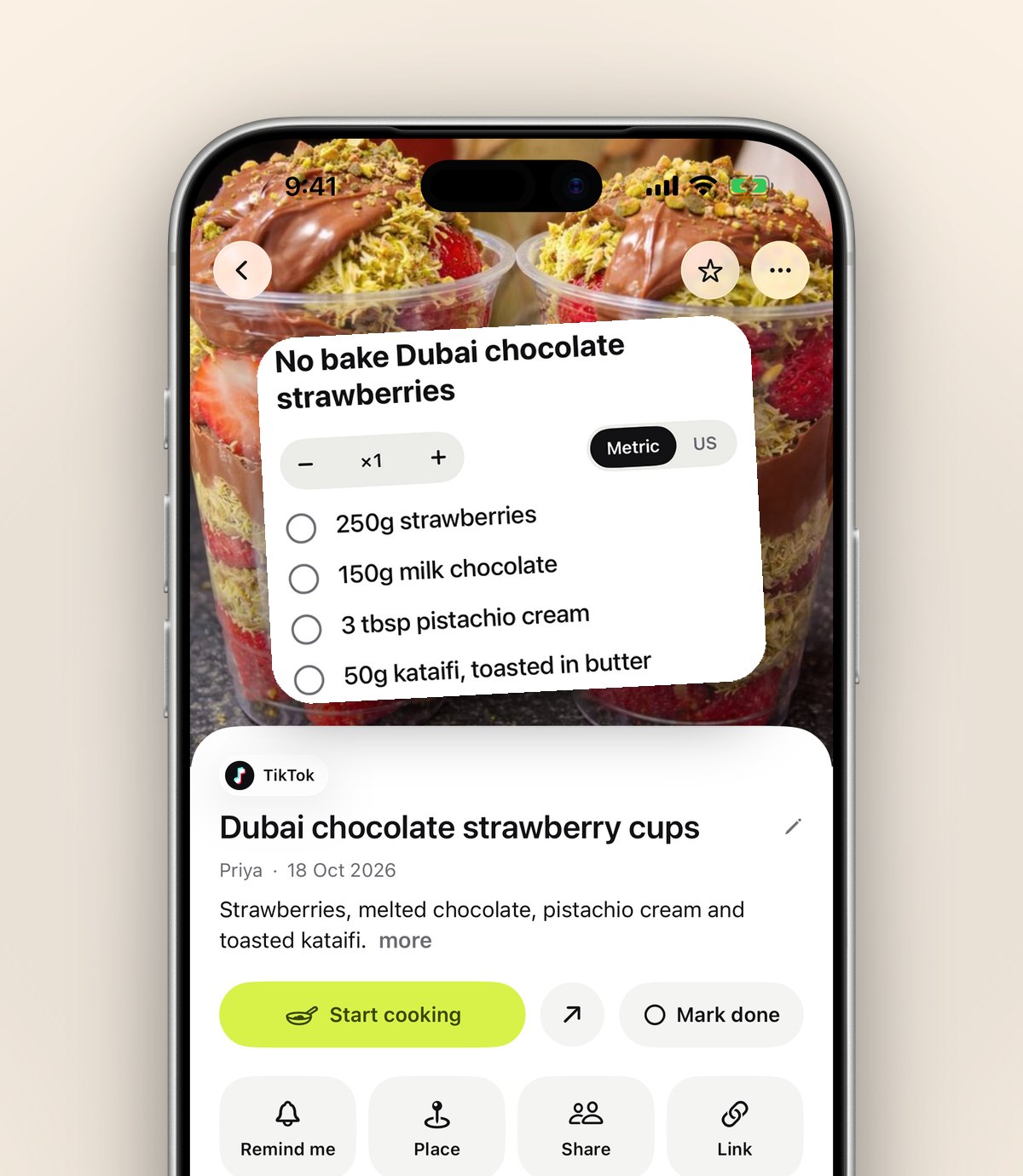
To save TikTok recipes in a way you can cook from, share each video to an app that keeps the caption, listens to the voiceover and turns it into ingredients and steps. anoli is a free iPhone app that files TikTok recipes into a Recipes folder; with anoli Pro, Summarise turns the caption into ingredients and steps and an attached video becomes a searchable transcript, so spoken quantities aren't lost.
TikTok is one of the best places on the internet to find something to cook. It's also one of the worst places to cook from. The recipe is said once, quickly, over music. The quantities flash up for half a second. The caption says "recipe in comments" and the comments are four hundred people asking for the recipe.
So you save it to your favourites, and that's the last you see of it. This guide is about saving TikTok recipes properly: catching what's said, not only what's written, and turning each video into a list of ingredients and steps you can follow at the hob.
Why are TikTok recipes so hard to follow later?
TikTok recipes come in a few different shapes, and each one hides the recipe in a different place.
- Voiceover recipes: the method and quantities are spoken, often fast, with nothing written down.
- Caption recipes: the full recipe is in the caption, which is cut off unless you tap more.
- Slide recipes: photo mode posts where each slide is a step, sometimes with the ingredients on the first slide.
- Link in bio recipes: the video is a teaser and the written recipe is on the creator's website.
On top of that, TikTok Favourites has collections but no way to search inside what was said, and if a creator deletes a video it disappears from your favourites. If you want to know more about where favourites live, the post on TikTok favourites covers it.
How do you save a TikTok recipe properly?
Instead of tapping the bookmark, share the video to anoli, a free iPhone app that saves posts from TikTok, Instagram and any website into folders. It reads the caption, sees that it's a recipe and files it into Recipes.
- 1On the TikTok video, tap the Share arrow.
- 2Choose the option that opens your iPhone's share sheet.
- 3The first time, scroll the app row to the end, tap More, then Edit, switch the app on and drag it to the front.
- 4Tap its icon. The video is saved to Recipes and you're back on TikTok.
If the app isn't sure the video is a recipe, it waits in Needs sorting for one tap. When you move a save to a different folder, it learns for next time. If it doesn't show up in the share sheet at all, the support page has the fixes.
Tip: Save the moment you see a recipe you'd cook, not later. Two taps now saves ten minutes of scrolling through your favourites on a hungry Thursday.
How do you get the recipe out of each kind of TikTok?
Voiceover recipes
These are the hardest to write down, because the recipe lives in the audio. With anoli Pro, attach the video to the save and the app listens to what's said in it, so the spoken method and quantities become a transcript. Search looks inside transcripts too, so you can find the video later by typing "miso" even if miso was only ever said out loud.
Caption recipes
The save keeps the whole caption, not the cut off version. Tap Summarise (anoli Pro) and the caption becomes ingredients and steps: a clean list of what to buy and a numbered method.
Slide recipes
Photo mode recipes stay swipeable after you save them, so you can flick through each step as you cook, just like you did on TikTok.
Link in bio recipes
When the full recipe is on the creator's site, open it in Safari, tap Share and save that page too. Put it in the same folder as the video, and add a note to the video saying "full recipe in the web save". That way the visual and the written recipe sit side by side.
Recipe in the comments
Sometimes the creator posts the recipe as a pinned comment rather than in the caption. Comments aren't part of what gets saved, so copy the comment text (press and hold it, and choose copy if the option appears) and paste it into a note on the save. Once it's in a note it's searchable and it can't get lost under hundreds of replies. If the recipe isn't written anywhere at all, that's when the transcript earns its keep.
Whichever kind of recipe it is, the goal is the same: everything you need to cook should live in the save itself, not in your memory of a video you watched three weeks ago.
How do you turn a TikTok into ingredients and steps?
Once the recipe is saved, Summarise does the heavy lifting. Here's how to check it and make it yours.
- 1Open the save and tap Summarise. You get a list of ingredients and a set of steps.
- 2Watch the video once at a slower speed. There are proper video controls for TikTok inside the app, so you can pause, scrub and slow it down to check quantities and see technique.
- 3If anything is missing or unclear, attach the video so the voiceover is included, then summarise again.
- 4Add a note with your own changes: "half the chilli", "serves 2, not 4", "use the big pan".
- 5When you've cooked it, mark it as done. Next time you open your Recipes folder, you can see which ones you've actually made.
Always treat a summary as a helpful starting point and check anything that matters, such as baking quantities, oven temperatures or allergens, against the original video or the creator's written recipe.
How do you cook from a saved TikTok recipe?
Turn on cooking mode. You see the ingredients first, then one step per page in big type, with big Back and Next buttons. Your screen stays on, so you don't have to tap it with oily fingers to stop it locking. If you want to see a step again in the video, the original is one tap away in the save.
Our post on cooking from your phone has more on setting up your kitchen so your phone is easy to read while you cook.
How should you organise TikTok recipes?
One big Recipes folder is fine for the first few weeks. After that, folders inside folders make it easier to decide what to cook. Pick a structure that matches the question you ask at 6pm.
- By meal: Breakfast, Weeknight dinners, Lunch boxes, Baking, Desserts.
- By effort: 15 minutes, One pan, Weekend projects.
- By ingredient: Chicken, Pasta, Veggie, Tofu.
Give each folder a cover photo from a dish you made, or a colour or emoji. Each folder shows its three latest saves peeking out, so you can see what's new.
Seasonal folders are worth it too. If you started a Christmas recipe folder this week, file your festive TikToks there so they don't get lost among weeknight dinners.
Tip: Search beats folders when you're standing in front of the fridge. Type the ingredient you need to use up, such as "leeks", and you see every recipe that mentions it in the caption, transcript or your notes.
Can you move your old TikTok favourites into folders?
Yes. TikTok lets you download your data, and anoli can read it. Go to Settings and Import saved posts, then choose your TikTok data download. Your favourites come in, and recipes are sorted into Recipes along with everything else. It's a good way to rescue the recipes you saved a year ago and forgot about.
For a broader look at tidying everything you've saved on TikTok, not only recipes, read how to organise saved TikToks.
What are the options for saving TikTok recipes?
Here's a fair look at the common ways people keep them.
- TikTok Favourites and collections: built in and instant. Good for keeping, not for cooking from: no ingredient list, no search inside what was said.
- Writing it out by hand: the most reliable way to get a recipe you can follow, and slow. Many people start and give up after three.
- Screenshots: capture the quantities on screen, but miss anything spoken and pile up in your camera roll.
- Recipe apps: apps like Paprika are very good at importing written recipes from food websites and planning meals. Video recipes with spoken quantities are harder for them.
- anoli: saves the TikTok itself, sorts it into Recipes, keeps the caption searchable, and with Pro turns it into ingredients and steps and listens to the voiceover.
If you cook from a mix of TikTok, Instagram and food blogs, the simplest setup is usually one place for all of it rather than a different tool for each, because you decide what to cook by what you fancy, not by which app it came from.
Start with the next recipe you see
You don't need to sort every favourite tonight. Set up the share button, save the next TikTok recipe you'd actually cook, summarise it and make it this week. Once one TikTok has turned into a real dinner, you'll never go back to the bookmark.
anoli is free to start with no account and no card. Summaries and transcripts come with anoli Pro, £10 a year. Download anoli free from the App Store, see reviews, or learn more on the anoli home page.
Questions people ask
How do I save a recipe from TikTok?
Tap the Share arrow on the video, open the share sheet and choose anoli. It saves the video and caption into your Recipes folder, sorted for you.
How do I write down a TikTok recipe that's only in the voiceover?
With anoli Pro, attach the video and anoli listens to what's said, keeping a transcript. Then tap Summarise to turn it into ingredients and steps.
Can I search TikTok favourites by ingredient?
TikTok doesn't search inside what was said in your favourites. In anoli, search looks through captions, transcripts and your notes, so typing an ingredient finds the recipe.
Do saved TikTok recipes disappear?
If a creator deletes a video, it goes from your TikTok favourites too. anoli keeps the caption, summary and your notes so you still have the recipe details.
Can I import my TikTok favourites into anoli?
Yes. Download your TikTok data, then in anoli go to Settings, Import saved posts. Favourites come in and recipes are sorted into Recipes.
Try it with your own saves
Free to start on iPhone and iPad. See what people say.