
Pocket shut down: the best Pocket alternatives for saving links
· 7 min read
THE SHORT ANSWER
Mozilla shut down Pocket in July 2025, so its users need somewhere new to save links. Instapaper and Safari Reading List suit people who mainly read long articles, Raindrop.io suits heavy bookmarkers, and anoli, a free iPhone app that saves links, posts and videos from any app into folders automatically, suits people who save from social media as much as from the web.
For years, Pocket was the quiet place where articles went to wait. You saw something interesting, tapped save, and it sat there until a train journey or a slow Sunday. Then in 2025 Mozilla announced it was closing Pocket, and in July 2025 the service shut down. The export window closed a few months later.
If you relied on it, you have probably spent the last year saving links into whatever was nearest: a note, a chat with yourself, a browser tab you are scared to close. This guide is for picking a proper home again. It covers what Pocket did well, the alternatives that are still around, and how to move without losing your habits.
What did Pocket actually do for you?
Before you choose a replacement, it is worth being clear about which part of Pocket you miss. People used it in quite different ways.
- A reading queue. Save long articles, read them later in a clean view without adverts and pop ups.
- A bookmark pile. Keep links you might need again: a tutorial, a product page, a useful thread.
- A discovery feed. Pocket recommended articles, and some people mostly used it for that.
- One place across devices. Save on the laptop, read on the phone.
Most people were really using it as a bookmark pile with good intentions. Be honest with yourself about that, because the right alternative depends on it. If you genuinely read most of what you saved, you want a reading app. If you mostly saved things to find again, you want something that sorts and searches well.
What are the best Pocket alternatives?
Here is a fair look at the main options in 2026. Every one of them is good at something.
Instapaper
Instapaper is one of the original read later apps and the closest thing to classic Pocket. It strips articles down to clean text, lets you highlight and add notes, and works on iPhone, Android and the web. If your Pocket habit was reading long articles on your commute, start here.
Safari Reading List
Built into every iPhone, iPad and Mac. Tap Share, then Add to Reading List, and the page syncs through iCloud. You can save pages for offline reading too. It is free and there is nothing to install, but there are no folders and very little in the way of organising. It works best as a short queue, not an archive.
Raindrop.io
Raindrop.io is a bookmark manager with collections, tags and a browser extension, and it runs on most platforms, including the web and Android. It suits people with a lot of links who like to organise them by hand and who switch between computers often.
Readwise Reader and Matter
Both are reading apps aimed at people who read a lot and want highlights, notes and newsletters in one place. They are more powerful than Pocket ever was, and Readwise Reader is a paid subscription. Worth a look if reading is a serious hobby or part of your job.
Apple Notes
Not a Pocket replacement exactly, but plenty of people ended up here. It is fine for a few links with your own thoughts beside them. It does not sort anything, and a note with sixty pasted links is hard to use.
anoli
anoli is an iPhone and iPad app that keeps everything you save online in one place and sorts it into folders for you. It is not a reading app with a stripped back article view, so if that is what you loved about Pocket, Instapaper is the closer match. Where it shines is when your saves come from everywhere: an article in Safari, a reel on Instagram, a TikTok, a YouTube video, a Reddit thread. They all go through the same Share button and land in the right folder.
How do the alternatives compare?
- Best for reading long articles: Instapaper, Readwise Reader, Matter.
- Best free option with nothing to install: Safari Reading List.
- Best for organising lots of links by hand, on any platform: Raindrop.io.
- Best for saving from social media and the web together, sorted automatically: anoli.
- Best for a few links with your own notes: Apple Notes.
There is no shame in using two. Plenty of people keep a reading app for long essays and a separate place for everything else they save.
Why do social media saves change the answer?
Pocket was born in a world where most things worth saving were articles. Now a lot of what people save is a video: a recipe reel, a workout, a restaurant on TikTok, a ten minute YouTube explainer. Reading apps are not built for those. They expect text.
If you look at what you actually saved in the last month, count how many were articles and how many were posts or videos. If it is mostly posts, a classic read later app will feel wrong within a week.
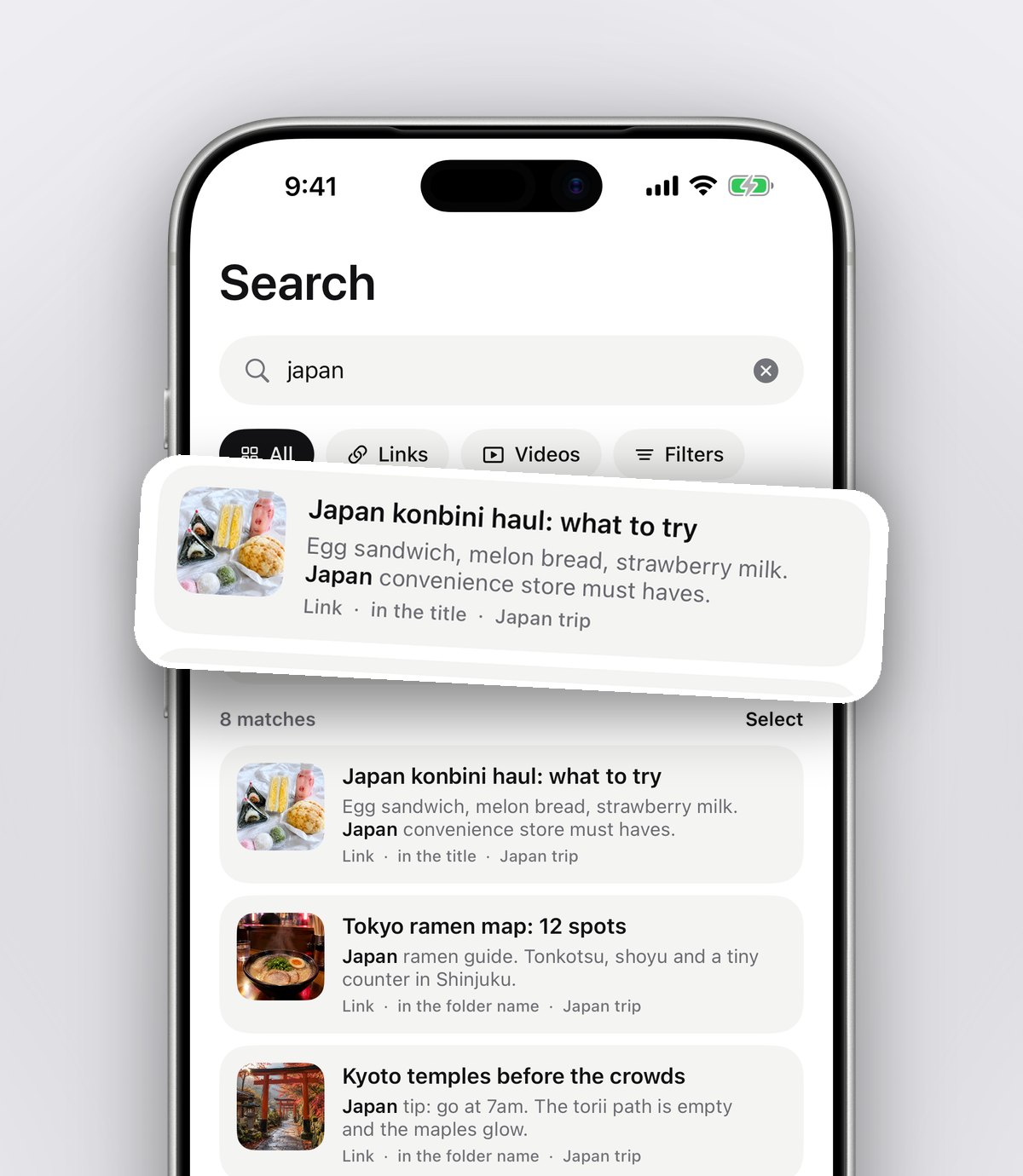
anoli was built for that mix. Instagram, TikTok, YouTube and Vimeo videos play inside the app with pause, scrub and speed controls. It reads the caption or page and puts each save into a folder like Recipes, Travel or Work, and anything it is unsure about waits in Needs sorting for one tap. Search then looks inside captions, transcripts, PDFs, your notes, tags and creator names, and shows the line that matched.
Tip: when you save an article you want to come back to, add a one line note saying why. "For the pricing section" or "send to Sam" makes it far easier to act on later, and search finds notes too.
How to move from Pocket to a new app
Here is a simple way to switch without a big weekend project.
- 1Decide what you mainly need: reading, organising, or saving from social apps. Pick one main tool from the list above.
- 2Put it where your thumb already goes. On iPhone, open any page, tap Share, scroll the app row to the end and tap More, then Edit. Switch your new app on and drag it to the front.
- 3If you save from a laptop, install the browser extension. For anoli, that is a Chrome extension called Anoli on the Chrome Web Store, and pages you save with it appear on your phone.
- 4If you kept your Pocket export, open it and skim it. Reshare only the links you still care about. Most people find that a big share of an old reading list no longer matters, and that is fine.
- 5Give it two weeks of real use before judging it.
If the share sheet step gives you trouble, our support page has the common fixes.
Should you import your whole Pocket history?
It is tempting to bring everything across. In practice, an archive of a few thousand old links often turns into the same guilt pile you had before. A cleaner start tends to work better: carry over the handful of things you return to, and let the rest go.
If you have other saved collections you do want to keep, like years of Instagram saves or TikTok favourites, that is a different story. The app can read the data download from Instagram, TikTok and Pinterest through Settings, then Import saved posts. Collections and boards become folders and everything else is sorted. Our guide to the best app to save Instagram posts explains that import in more detail.
What should you look for in any Pocket alternative?
Whatever you choose, check these before you commit your saving habit to it:
- Can you save in one tap from your phone? If saving is slow, you will stop.
- Can you find things again? Search that looks inside the saved content, not just titles, matters more than any other feature.
- Does it handle what you actually save? Articles, videos, PDFs, or all three.
- Can you get your data out? Pocket's closure is the reason you are reading this. Choose something with an export. Ours exports everything as a zip with one button, and deleting your account is one button too.
- Is the business sustainable? A free service with no clear way of paying for itself can disappear. A small, clear price is not a bad sign.
How much do Pocket alternatives cost?
Safari Reading List and Apple Notes are free. Instapaper and Raindrop.io both have free tiers with paid upgrades. Readwise Reader is a paid subscription.
anoli is free to start, with no account and no card. anoli Pro is £10 a year, or the local equivalent, through the App Store, and you can cancel any time in your iPhone settings. Pro adds unlimited saves, notes, photos and files, folders shared with friends, picture covers, and summaries and transcripts, so a long video or caption can become a short readable summary.
The bottom line
If you want Pocket back exactly as it was, choose Instapaper. If you want a free queue, use Safari Reading List. If you live in a browser on a laptop and like tagging, Raindrop.io is great. If your saves come from Instagram, TikTok and YouTube as much as from websites, and you want them sorted without the admin, give anoli a try: get it free on the App Store.
You can read more about how the app works on the anoli home page and see what people have said about it on our reviews page. If you save a lot of TikToks too, our guide to organising saved TikToks is a good next read.
Questions people ask
Is Pocket still available?
No. Mozilla shut down Pocket in July 2025, and the window for exporting saved items closed later that year.
What is the closest app to Pocket?
Instapaper is the closest match for reading long articles later in a clean view. If you mainly saved links to find again, a bookmark manager or a save app with search may suit you better.
What is the best free Pocket alternative on iPhone?
Safari Reading List is free and built in, though it has no folders. anoli is free to start and sorts links, posts and videos into folders automatically.
Can I save links from my laptop to my phone?
Yes. anoli has a Chrome extension called Anoli on the Chrome Web Store. Pages you save on your laptop appear in the app on your iPhone.
Can anoli save TikTok and Instagram posts as well as articles?
Yes. It saves from any app with a Share button, including Instagram, TikTok, YouTube, Reddit, X and every browser, and files each save into a folder.
Try it with your own saves
Free to start on iPhone and iPad. See what people say.