
The best bookmark manager for iPhone if you hate bookmarks
· 6 min read
THE SHORT ANSWER
The best bookmark manager for iPhone, if you dislike traditional bookmarks, is one that saves from any app's Share button, sorts the link for you and lets you search it later. anoli is a free iPhone app that does this for websites, YouTube, Instagram and TikTok, with folders, full search and a Chrome extension that sends pages from your laptop to your phone.
Bookmarks were invented for a world of desktop computers and web pages. You'd find a useful site, add it to a folder, and come back to it from the same browser. On an iPhone today, that model creaks. Half of what you want to keep isn't a web page at all, it's a reel or a TikTok. Bookmarking in Safari means choosing a folder in a tiny menu. And finding a bookmark again means scrolling a list of titles with no pictures.
If you've given up on bookmarks and rely on open tabs, screenshots and memory instead, you're in good company. This guide looks at why bookmarks don't work for many people, what a better bookmark manager looks like on iPhone, and how the options compare.
Why do so many people hate bookmarks?
It's not you. Traditional bookmarks have some real drawbacks on a phone:
- Filing takes effort. Every bookmark asks you to choose a folder, so most end up in one big unsorted list.
- They're text only. A list of page titles gives you little to recognise things by.
- They live in one browser. Safari bookmarks don't include things you saved in Chrome, Instagram or TikTok.
- Search is basic. You can search titles and addresses, but not what was on the page or why you saved it.
- They pile up silently. You rarely see your bookmarks unless you go looking, so they never get tidied.
The result is that people switch to keeping dozens of tabs open, which is its own kind of chaos.
What should a bookmark manager on iPhone do?
If you're going to replace bookmarks, the replacement has to fix those problems. Look for:
- 1Saving from the share sheet in any app, not just one browser.
- 2Automatic sorting, so you don't pick a folder every time.
- 3Previews, so you can recognise saves at a glance.
- 4Search inside the content, not just titles.
- 5Sync across devices, including a laptop.
- 6An export button, so your links are never trapped.
What are the best bookmark managers for iPhone?
Here's a fair look at the main options, including the ones built into your phone.
Safari bookmarks and Favourites
Good for: a small set of sites you visit often. Favourites appear on Safari's start page, and everything syncs through iCloud to your Mac and iPad. It's free and needs no setup. It's less good for large collections or anything outside the web.
Safari Reading List
Good for: articles you want to read soon. Add a page with Share, then Add to Reading List, and you can set it to save pages for offline reading. Like bookmarks, it doesn't sort or hold social posts. Our guide on saving links on iPhone covers both in more detail.
Raindrop.io
Good for: people with large link libraries across browsers and computers. It has collections, tags, previews and apps for most platforms. Sorting is largely manual, which suits people who enjoy curating.
Instapaper
Good for: reading long articles in a clean view. A longstanding read it later app with a loyal following. It's focused on text rather than videos and social posts. If you were a Pocket user, our guide to Pocket alternatives has more on this category, since Mozilla shut Pocket down in July 2025.
Notes apps
Good for: people who like writing context around links. Apple Notes and Notion are flexible, but each link is pasted and arranged by hand.
anoli
Good for: people who hate filing bookmarks. anoli is a free iPhone and iPad app that saves posts from Instagram, TikTok, YouTube and any website into folders, and sorts each save for you. It's built for the mix of things we save now, not just web pages.
How does a save app work as a bookmark manager?
Here's how it handles each of the problems with traditional bookmarks.
Saving from anywhere
Tap Share in Safari, Chrome or any other browser, or in Instagram, TikTok, YouTube, Pinterest, X, Reddit, Threads, Facebook or Telegram, and choose anoli. Even Apple Notes can share to it. The first time, scroll the app row in the share sheet to the end, tap More, then Edit, switch it on and drag it to the front.
On iPhones with an Action Button, you can set it to Save to anoli, and there's a Control Centre button too.
No folder picking
It reads the page or caption and files the save into the right folder: Recipes, Travel, Workouts, or whatever folders you've made. When it isn't sure, the save waits in Needs sorting, where one tap files it. Move a save once and it learns where similar ones should go.
Folders you can recognise
Folders can sit inside folders, and each one shows its three latest saves peeking out, with a cover photo, colour or emoji of your choice. Instead of a list of titles, you see what's inside.
Search that finds things
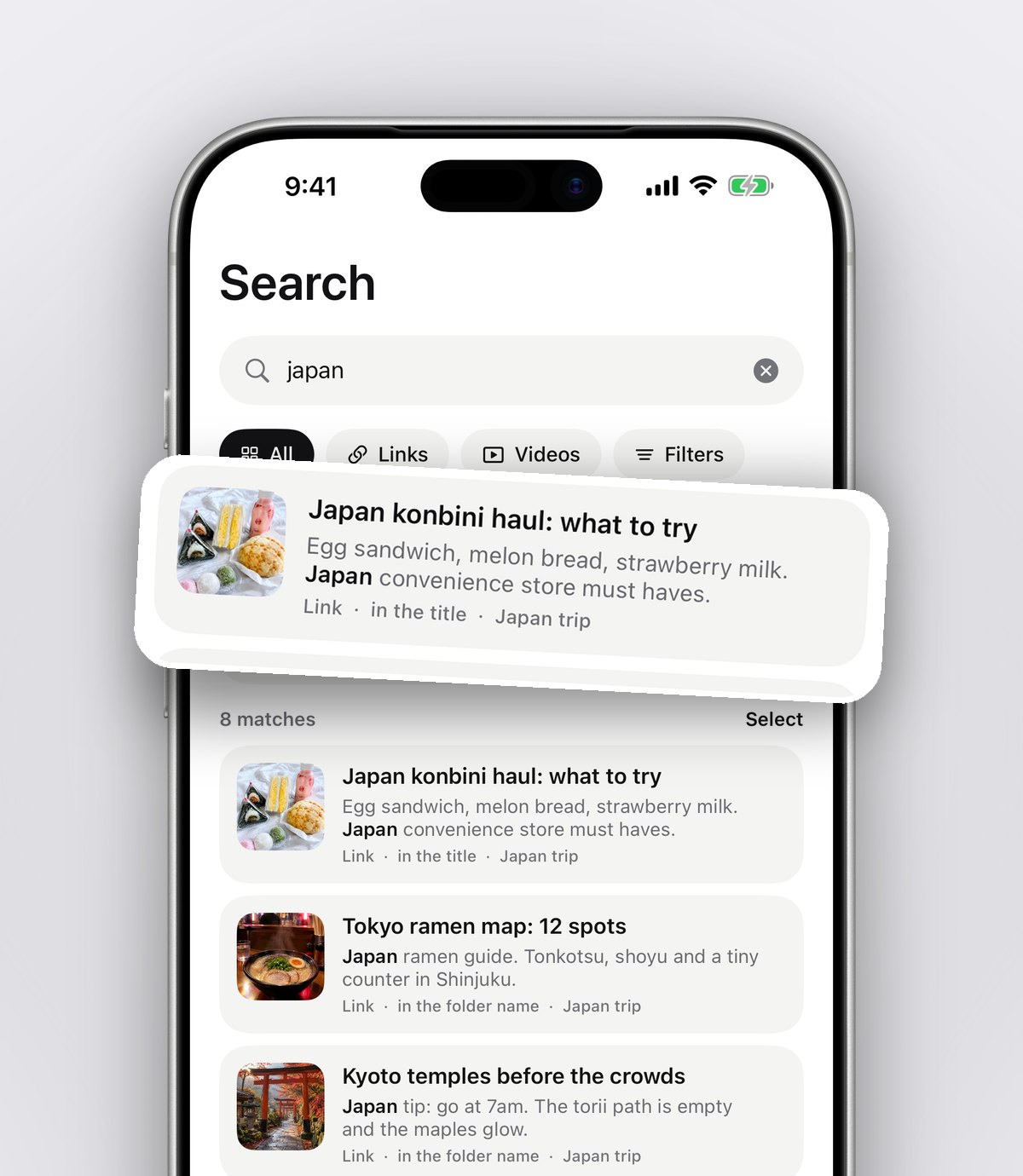
Search looks inside notes, captions, transcripts, PDFs, tags and creators, and shows the matching line. Filter by links, notes, photos, videos or files, or use the calendar to see what you saved on a particular day.
Tip: when you save a link, add a few words about why. "Good guide to repotting" or "compare with the one Ellie sent" makes the save findable by what you'll actually remember.
Your laptop too
Install the Anoli extension from the Chrome Web Store and one click saves the page you're on. It appears on your phone, sorted like any other save. That's the bit traditional bookmarks never managed: a page found on a laptop at work, ready on your phone on the way home.
What folders should you start with?
You don't need a perfect structure on day one, and since the app sorts for you, the folders mostly take care of themselves. If you like having a starting point, these cover most people's saves:
- Read later: articles and long posts.
- Watch later: videos from YouTube, TikTok and Instagram.
- Recipes, Travel and Workouts: the big three for social media saves.
- Shopping: products you're considering.
- Work or Study: links you need for a project.
As your collection grows, add folders inside folders. A Travel folder might gain a Lisbon folder before a trip, and a Work folder might gain one per project.
Moving your old bookmarks and saves
You don't need to move every old bookmark. Most people find that only a small share are still useful. A gentle approach:
- 1Open your Safari bookmarks and skim the list.
- 2For anything you still want, open it and share it to the app.
- 3Delete the rest. If you haven't opened it in two years, you probably won't.
- 4For social saves, use Settings and Import saved posts, which reads the data download from Instagram, TikTok (favourites) and Pinterest. Collections and boards become folders, and everything else is sorted.
What about all those open tabs?
Tabs are often bookmarks in disguise. If you have hundreds open, try this: go through them once, share anything worth keeping to the app, and close the rest. Safari can also close tabs automatically after a day, a week or a month, in Settings, Safari, Close Tabs. With your saves somewhere safe, letting old tabs close stops feeling risky.
Is your data safe?
A bookmark manager holds a lot of your browsing life, so it's worth checking. Here, folders, links and notes sync to your account. Photos, videos and files stay on your phone unless you put them in a shared folder or use one as a cover. One button exports everything as a zip, and one deletes your account.
Which bookmark manager should you choose?
- A few favourite websites? Safari Favourites are enough.
- Articles to read later? Reading List or Instapaper.
- A big, carefully tagged link library across computers? Raindrop.io.
- Links, videos and posts from every app, sorted without effort? anoli.
If you're still deciding whether you need a dedicated app at all, our explainer on what a save for later app is can help, and if videos are a big part of what you save, see how to save YouTube videos to watch later, sorted by topic.
Try a week without bookmarks
For one week, every time you'd normally bookmark something or leave a tab open, share it to the app instead. At the end of the week, open the app and see how much of it you can find in seconds. That's the test of any bookmark manager.
It's free to start with no account and no card, and Pro is £10 a year for unlimited saves. Download anoli on the App Store, read reviews from people using it, or see more on the anoli home page.
Questions people ask
What is the best bookmark manager for iPhone?
It depends on what you save. Safari bookmarks suit a few sites, Raindrop.io suits large tagged link libraries, and anoli suits people who save links, videos and posts from many apps and want them sorted automatically.
How do I organise bookmarks on iPhone?
In Safari, open Bookmarks, tap Edit and create folders, then move bookmarks into them. If you'd rather not file each one, a save app sorts links into folders for you.
Can I save Instagram and TikTok posts as bookmarks?
Not in Safari. A save app saves posts from Instagram, TikTok and YouTube alongside web pages, with the videos still playable.
Can I send bookmarks from my laptop to my iPhone?
Safari syncs bookmarks through iCloud between Apple devices. For Chrome, the Anoli extension saves the page you're on in one click and it appears on your iPhone.
Is there a free bookmark app for iPhone?
Yes. Safari bookmarks are built in, and anoli is free to start with no account or card. Pro costs £10 a year for unlimited saves.
Try it with your own saves
Free to start on iPhone and iPad. See what people say.